1. Overview
KunakCloud is a cloud-based platform which offers a complete set of services associated to KUNAK devices: from data storage and visualization to remote control, management and configuration.
KunakCloud REST API is meant to offer programmatic access to the data captured by KUNAK devices. Through a user-friendly API, you can get the stored information of your devices or even change their configuration remotely.
The main idea of this API is to offer Kunak's customers a way to replicate data into their systems so they can get the most of our devices and go beyond KunakCloud functionalities and develop their own ones.
User documentation guidelines:
o Every method request must include the authentication information in the HTTP header as indicated in the section 'All the timestamps in this API use the UTC zone. It is the responsibility of the programmer using this API to parse these timestamps to the desired format and time zone.
o Authentication and security'. This information is omitted in this document in every described request for simplicity purposes.
o Pay attention to special characters like whitespaces in device or element tags. Follow URL encoding rules (https://en.wikipedia.org/wiki/Percent-encoding). For example, a white space (' ') is encoded as %20.
o Comments are indicated using a double slash ('//'). They are used within JSON responses or JSON input data just for explanation purposes.
o Variables included within the text are expressed using the notation {variable_name}.
o All the timestamps contained in this document use UTC as a time reference.
2. Glossary
API (Application programming interface): an abstraction layer consisting of functions and processes –each of them with inputs and outputs clearly defined- to be used by other software.
JS (JavaScript programming language): the most famous language for front end dynamic web development.
JSON (JavaScript Syntax Notation): a simple file format that uses human-readable text. This is the chosen format for inputs and outputs in this API.
REST: software architecture style that defines a set of rules to build web services based on a set of uniform and predefined requests/responses.
Device: any Kunak product connected to the cloud.
Location: virtual site created by the user to analyse location data without taking into account the devices that have passed through the place. Allows you to manage your data by locations by assigning devices to specific spots.
SN: serial number. Unique id assigned by Kunak to all its devices.
Element: a measurable part of a Kunak device. For example, a sensor or the device's battery or signal levels.
Actuator: a part of the device that allows executing an action on a device, for example opening a valve.
Operational parameter: a parameter whose value can affect the operation of a device. This value can be of different types: number (integer or decimal), text or binary. The operational parameters can belong to a Kunak device or an external one connected through communication protocols such as Modbus.
Sending period: the time between consecutive connections of a device.
Storage/sampling period: the time between consecutive samples of an element
Start time/end time: beginning and end of connections and samples. The device won't send or capture data beyond these times.
x0, x1, x2: coefficients of the polynomial used to approximate the element response if it works in raw mode
Decimal(x,y): a decimal number with x digits and y decimal places
Max and min threshold: whenever an element's read exceeds them under certain persistence conditions, action will be triggered (register an event, send an email, etc.).
‘next_’ (parameter preceded by ‘next’): this value will be assigned –and queued until then- to the device's parameter in the next communication cycle with the device
Persistence: consecutive times that an element value has to overcome its threshold to activate an alarm (KunakCloud web and email notification)
Heartbeat: indicates whether the node is alive or not based on the next estimated connection which depends on the last connection and the current sending period. Set this parameter to true if you want to get email notifications and see a red node status in KunakCloud's web when the node hasn't been able to connect in the next estimated period. If you turn off a device, you should set this parameter to false.
Heartbeat: checking sequence that the Kunak Cloud platform makes with every device to corroborate whether is active or not. Registered once when the device has not connected within the estimated time interval (last connection + sending period + network offset). Once a device connects again, its heartbeat alarm is disabled.
Warning: events generated by the devices when the sensor threshold is reached. It is registered when as many consecutive reads as the configured persistence exceed the configured thresholds. Once the samples no longer exceed the thresholds, alarms are disabled.
Alarm: events generated by the Kunak Cloud to help with the operation of the devices. Inform of heartbeat, battery drain, broken sensors, lack of data, etc.
Preheating: required time by the sensor to meet the right conditions to start working properly.
Virtual device: a non-standard device provided by the client that will use KunakCloud as its web platform. These devices have their own structure, settings, and data. All this information must be inserted into the KunakCloud's database with special methods explained in section 7.6 'Virtual device methods'.
Particle sensor low power: power mode implemented to improve the battery duration of the device when is solar powered.
Shutdown charge under: threshold for device’s charger voltage level under which the device is suspended. The device stays suspended until it detects that charge voltage level is back above the threshold.
3. Quickstart guide
This section covers the minimal information needed to make and understand the first HTTP request to KunakCloud REST API.
3.1 Data model and format
With this API, it is possible to request information from users, devices, elements, actuators, and operational parameters. A user account can have several devices associated with, each device giving access to its different elements, actuators, and operational parameters. Some settings of devices, elements, actuators, and operational parameters can be edited programmatically to automatize the systems within the Kunak devices are integrated with.
Besides the settings, it is possible to extract historical data form elements in the form of samples or alerts. On the other hand, operational parameters' configuration updates can also be collected as historical data which can be useful to manage a machine.
This API uses the JSON text format as input and output format and all the timestamps are UTC.
More detailed information in the sections 'Example of use' and 'Data and time format'.
3.2 Access and authentication
To access this API, a valid KunakCloud account is required. All Kunak cloud services (web platform and REST API) are accessible through a single account, provided that the user has the necessary permissions assigned.
The API is exposed as a standard HTTP interface, allowing interaction with KunakCloud data using common methods such as GET and POST. Authentication is performed using a token-based mechanism. Users must first obtain an access token via the authentication endpoint and include it in subsequent requests using the Authorization header with the Bearer scheme:
Authorization: Bearer <token>
Each account is subject to rate limits, including a burst limit of 10 requests per second and a monthly quota of requests. Applications must be designed to handle these constraints properly, implementing retry logic, error handling and request throttling where necessary.
Access to specific endpoints depends on the permissions associated with the account. In addition to general web services access, certain operations require explicit authorization, so permission configuration must be verified before attempting restricted requests..
More detailed information in the sections '6.Authentication and security', '7.Service limits and restricted operations' and '8.Exception and error handling'.
3.3 Your first request (with postman)
Before writing your first line of code to try this API, it is advisable to test some requests with a software tool that supports the HTTP protocol. This way, it is possible to check quickly everything is up and running. There are many tools out there, but we will provide an example using Postman, a free software tool. A postman collection file containing all the requests can be found in ‘Support’ area of the KunakCloud web. The collection must be imported to the Postman software once it’s installed.
This collection classifies requests in user method, device methods, element methods, and operational parameters methods. The left column shows this classification as an expandable/collapsible tree map.
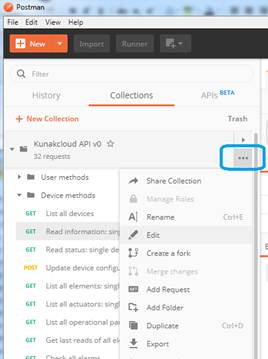
Figure 1 – Postman: request collections
Every collection allows the configuration of global variables which ease the reutilization of some values. In this case, variables like device id, element id, user, and password are set to avoid writing them continually. Variables are notated like this: {{variable name}}. To edit these variables, click on the button highlighted in the Figure 2 – Postman: Edit postman.
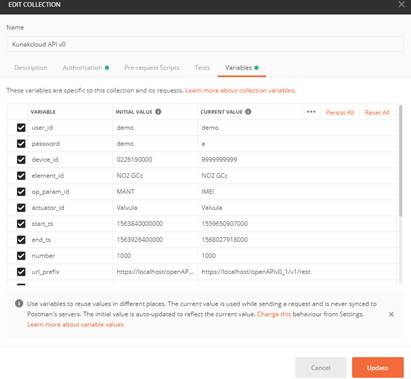
Figure 2 – Postman: Edit postman
Update the values of the tab ‘Variables’ with:
o User_id: the name of the account to accede (minimum required)
o Password: the password of the account (minimum required)
o Device_id: S/N of the device to ask for info
o Element_id: Name of the element to take info
o Op_param_id: name of the operational parameter (if needed)
o Actuator_id: name of an actuator (if needed)
o Start_ts: Timestamp in milliseconds of the first value to request
o End_ts: Timestamp in milliseconds of the last value to request
o Number: Number of values asked
o url_prefix: prefix of the URL for request the info. It will be always https://kunakcloud.com/openAPIv0/v1/rest
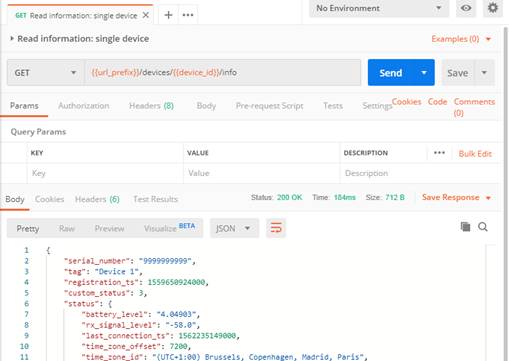
Figure 3 – Postman: Variables tab
Now you are ready to get the information of a device by selecting the 'Read information: single device' GET request. A new tab to the right of your collection column will appear. Let's see what happens when clicking on 'Send':
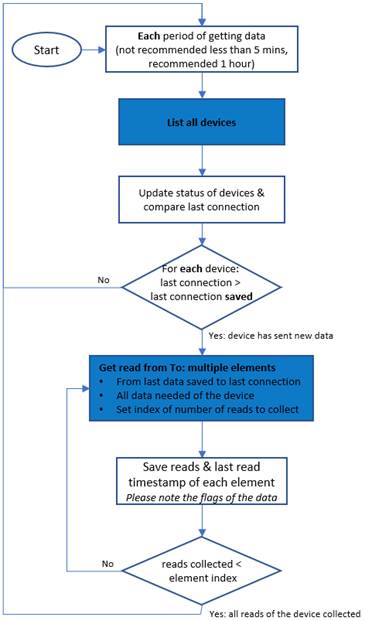
Figure 4 – Postman: specific request
Congratulations! A JSON response containing information of the requested device should have been received. If you don't get any response, check again your configuration (global vars, valid user and password, the serial number of a device associated with the authenticated account).
Once you have a deeper knowledge, you are ready to program your applications using the methods in sections 9.API methods for Kunak devices.
In the next section you can find examples of how to program the API. *Note: as you can see, the url uses the global vars {{url_prefix}} and {{device_id}}. You can also check the 'Authorization' tab (next to 'Params', top left) and see that the value 'Inherit auth from parent' is selected. This value is also selected for the parent folder ('Device methods') that inherits it from the collection global vars.
3.4 Example of use
In Kunak, we have developed a reference implementation to demonstrate best practices for automating API calls. The example is available at: https://github.com/kunak-cloud/Kunakcloud-API-REST-use-case-example. It includes a README.md file with step-by-step instructions to guide users through the implementation process following Kunak’s recommended practices.
3.4.1 Get sensors reads of all devices
Kunak devices have two core time settings that must be taken into account:
· The sensor's sampling period.
· The device's sending period.
A sensor sample will be stored every sampling period per sensor and all the collected/stored samples of every sensor will be sent every sending period. Thus, the process that requests data using the KunakCloud REST API must wait for certain time (sending period + communications offset + data processing/storage) between consecutive calls to the API in order to get new data from the desired device. It can be a scheduled script (e.g. crontab in Linux systems) waiting the already mentioned time between executions.
To avoid calls without data, you must save the last connection date in order to compare it with the actual. If it matches, nothing more must be done, if it has changed it means that there are new data to be download from the last date of the last datapoint saved previously.
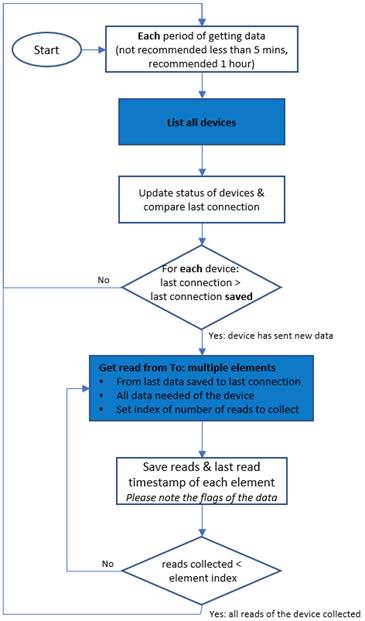
Figure 5 – Flow chart for data replication
|
|
Do not repeat the data collection process every very short period of time. The devices only send new data every configured "sending period". Minimum delay recommended of 5 minutes, delay recommended of 30 minutes. |

To avoid getting 'Too many requests per second' and lose or repeat requests, this script must include delays. Since the limit is currently set to X calls per second per account, a good idea could be doing blocks of X calls to get the reads of X device and add a delay of one second after this block. Once the reads from those X devices have been retrieved, repeat it with the X following ones.
See the API limits at 7.1 API limits section.
In order to get the most useful and correct data, it is recommended that once a day make the call of the validation log. This is because there are some validation flags that are processed in different periods: instantaneous, hourly, daily, weekly.
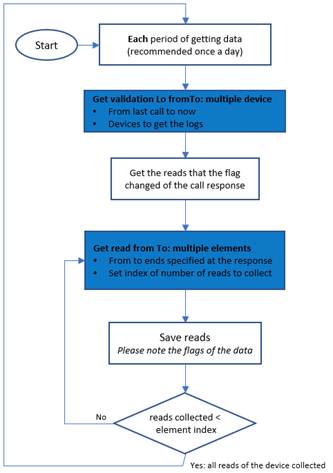
Figure 6 – Flow chart to get validations flag
4. Data model
KunakCloud applies a simple data hierarchy based on the following key concepts:
o Account: a person or program accessing KunakCloud. There are two types of accounts in KunakCloud:
· Organization: the top account of a company. It contains business information like company name, address, contact email address and fiscal identification. It could have special permissions like creating more accounts or registering devices. This is the recommended account for companies that have bought their first devices.
· User: a basic account. It has limited permissions: it can't create other accounts or register devices. This is the recommended account for workers of a company or demonstration purposes.
o Device: your data capturing device, identified by a unique serial number plus a part number combination. Every device has several elements that define the device type (standard, air quality, opc…).
o Element: a measurable element (battery, radio signal level, sensor, counter, switch…)/a sensor whose value along time is important. Kunak Cloud stores historical data for every element. Each device usually has multiple elements. Each element is identified by a tag.
o Operational parameter: a parameter whose current/last value is important. Typical operational parameters could be additional device identification information, machine working mode conditions and every new custom editable parameter to be added by the user. Each device usually has multiple operational parameters. Each parameter is identified by a tag.
o Actuator: a component of the device which is responsible for controlling another device or system. Actuators are only available on some Kunak devices. Each device can have multiple actuators. Each actuator is identified by a tag.
o Data: element samples/reads. Every read is timely referred and can be geographically referred by using an optional GPS module included in some KUNAK devices. Each element can have multiple reads stored at KunakCloud with only one value per timestamp and a validation flag.
o Warning: event triggered by the device when some conditions are met. Those conditions are specific for each element and occur when sensor reads exceed thresholds (threshold warnings).
o Operation Alarms: Events trigged by the cloud after an analysis of the data. Those alarms can be from battery discharging, uncalibrated sensor or devices failing to connect within the estimated communications windows (heartbeat alarms).
In summary, Kuna Cloud’s data hierarchy is as follows:
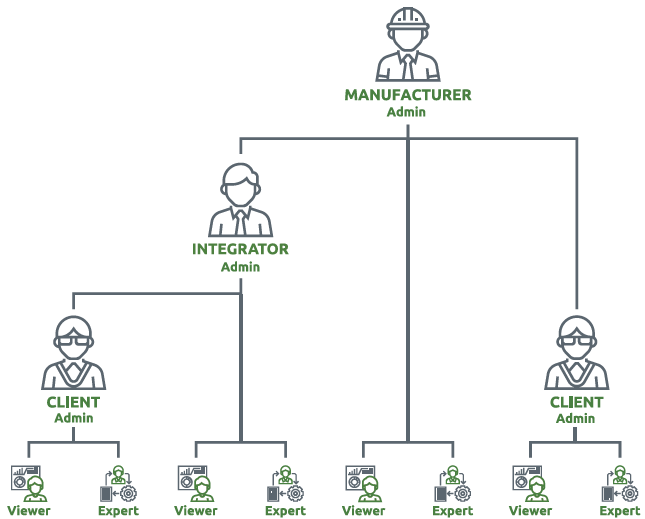
Figure 7 – Simplified data model
A Kunak device can have connected elements and actuators and a series of operational parameters.
Elements have associated historical data and alarms. They are the logical representation of a sensor (analog or digital input that captures data every sampling period) so they have associated historical data.
Actuators have a state and scheduled actions can be set at any time. They are the logical representation of an actuator (an output that can be connected to other systems as input to control them).
Operational parameters are related to 1) additional attributes for any device or 2) working/limit conditions of a machine connected to the Internet through a Kunak M2M or Industry card. They can be queried or updated at any moment. Some operational parameters are periodically updated so they can have historical data associated.
A user can manage other users: it's possible to create, edit or delete subuser accounts, link/unlink devices, and edit permissions. Not all users can create more users since there are 4 user levels to avoid infinite recursion:
o Level 1 and 2: these users can create other manager users (levels 2 and 3 respectively). These levels fall into a manufacturer/distributor role.
o Level 3: this user can create only final users (level 4). This level falls into a final customer company role.
o Level 4: this user cannot create more users. This level falls into a user from a final customer company.
Users can share access to a device. A device contains elements (sensors), actuators and operational parameters.
User's hierarchy is as follows:

Figure 8 – User hierarchy
5. Data and time format
All API requests and responses use JSON as the data format. JSON (JavaScript Object Notation) is a light and easy to write and read format for data exchange. JSON is widely used as a standard format in web services; it has much less overhead than XML and it is easier to parse.
All the timestamps in this API use the UTC zone. It is the responsibility of the programmer using this API to parse these timestamps to the desired format and time zone.
6. Authentication and security
This section explains how the KunakCloud REST API security and authentication system works: how to obtain an access token, how to include it in requests, and how to manage its expiration.
6.1 Communication Security
All requests to the KunakCloud REST API are sent over HTTPS (HyperText Transfer Protocol Secure), an encrypted communication protocol that protects data in transit. No request to the API can be made without prior authentication.
The access permissions and restrictions of each user in the KunakCloud REST API are the same as those the user has on the KunakCloud platform.
6.2 Token-Based Authentication System
The KunakCloud REST API uses token-based authentication. This system replaces the previous Basic Authentication method (Basic Auth), which sent the username and password in every request. The new system improves security by avoiding the continuous transmission of sensitive credentials.
The access token is a text string that acts as a temporary credential. It may appear in the server response under different field names: token, access_token, authToken, or jwt (JSON Web Token).
Obtaining or refreshing an authentication token does not consume API calls from the account quota.
Token validity: The token is valid for 10 minutes. Once expired, a new one must be requested.
6.3 Process to Obtain and Use the Token
Step 1 — Request the token (Fetch Token):
Send an HTTP POST request to the KunakCloud REST API authentication endpoint, including the user credentials in the request body in JSON (JavaScript Object Notation) format.
- Method: POST
- URL: https://kunakcloud.com/openAPIv0/v1/rest/auth/login
- Request body (payload): Include username and password in JSON format.
Example body:
{
"username": "your_username",
"password": "your_password"
}
If the credentials are valid, the server returns an access token in the response.
⚠️ Error code 419: If the server returns HTTP response code 419, it means the token has expired. A new token must be requested by repeating this step.
Step 2 — Include the token in each request:
Once the token is obtained, it must be included in the HTTP Authorization header of every subsequent API request, using the Bearer scheme:
Authorization: Bearer <token>
Replace <token> with the token value obtained in Step 1.
Step 3 — Manage token expiration:
The token is valid for 10 minutes. Before each request, check how much time has elapsed since the token was obtained. If the token is about to expire or has already expired, request a new one by repeating Step 1.
The reference implementation provided by Kunak Technologies handles this process automatically, checking the token's age before each request and renewing it when necessary.
7. Service limits and restricted operations
7.1 API limits
Every KunakCloud account with access to the REST API has the following limits:
o Burst limit: 10 requests per second. Once this limit is reached, a 'Too many requests per seconds' message with code 429 will be received as an HTTP response.
o Monthly limit: every account has a monthly limit of 10,000 API calls. Once this limit is reached, a 'Monthly usage has been exceeded' message with code 429 will be received as a response. You can increase this limit with API call packages contacting Kunak.
o Max reads per call: each call has a limit of maximum data that can provide. For each call can be different, the limit is specified in each call of this document.
To avoid large and slow responses, some requests (e.g. get reads or events) contain an input parameter called 'number' that limits the size of responses to improve application usability and response times.
7.2 Requests with specific permissions
Besides the API limits, every KunakCloud account has a set of additional permissions that restrict the available requests. Those additional permissions will be detailed in the subsection 'Request' for all the requests that require them.
8. Exception and error handling
When programming applications that consume the KunakCloud REST API, some exceptions and errors can happen both in the client and the server-side. To deal with those exceptions and errors on the client-side, some recommendations are given in the following paragraphs.
8.1 Too many requests
If an application calls the REST API too many times per second, a 'Too many requests per second' response with a 429 code will be received. Since this response contains no useful data (just the error message), some device data can be lost in a client application. For example, a classic line chart could contain information gaps within the periods associated with these erroneous responses.
To avoid this problem, just add delays every X request where X is the maximum number of requests per second supported by the KunakCloud REST API. For example, do X requests, wait 1 second and do again X requests, repeating this process many times needed. And do not forget to check the response code of every request in the application's source code before skipping to the next request. This way, all data can be collected, and your application will work smoothly.
See the API limits at 7.1 API limits section.
8.2 Bad requests
Malformed URLs and wrong input data are the main causes of erroneous responses that can include error messages detailing the error cause or even empty data.
Error messages (a 404 code response, 'Resource not found') will be received as response when requesting a resource with a bad URL syntax (e.g. a method that doesn't exist).
Empty messages (a 200 code response, 'OK', with empty JSON objects or arrays) will be received as response when the requested device, element or parameter don't exist within the context of the authenticated account or requested device.
Wrong input data like the one included in the POST methods will lead to error messages (a 400 code response, 'Bad request').
8.3 Error messages and codes
KunakCloud REST API uses the standard HTTP response codes (see detailed information in this link). The following table shows the different error codes used by KunakCloud REST API:
|
|
Meaning |
Main causes |
|
|
OK |
Well-formed requests with valid or invalid ids. |
|
|
Bad request |
Wrong input data: wrong values or tags for some attributes. |
|
|
Invalid user authentication |
Invalid authentication header. Check the 'Error! Reference source not found.' section. |
|
|
Invalid serial number or location Id |
Incorrect serial number or location Id |
|
|
Forbidden |
- The authenticated account doesn't have sufficient permissions to execute the request. See 'Service limits and restricted operations' section. - Some devices (virtual ones) or elements (virtual or internal ones reserved by Kunak) can't be modified. See 'Service limits and restricted operations' section. |
|
|
Too many requests |
- Burst limit (requests/s) reached - Monthly limit (requests/month) reached |
|
|
Server error |
- Database server unavailable - Software bug |
* Note: upon getting this response, please contact Kunak at [email protected] giving us information about this issue so we can examine and fix it.
9. API methods for Kunak devices
There are multiple methods/functions, split into several types depending on the application context: user, devices, elements or operational parameters. It is important to note for the upcoming subversion updates that every method starts with the url format: openAPIv{main version}/v{subversion}/rest/. For the API described in this document (REST API v0.1), {main version} = 0 and {subversion} = 1.
9.1 User methods
9.1.1 Get info
It returns a summary containing the settings and service usage of the requested user. The requested user could be the currently authenticated user or one of the users created from this user. No security credentials (password) are included in the response.
9.1.1.1 Request
o
URL: https://kunakcloud.com/openAPIv0/v1/rest/users/<user_id>/info
o HTTP method: GET
9.1.1.2 Request parameters
|
|
Description |
|
user_id |
The user name used to log into kunakcloud.com |
Table 2 - Read information: single user. Request parameters
9.1.1.3 Sample request
https://kunakcloud.com/openAPIv0/v1/rest/users/demo_user/info
9.1.1.4 Response codes
|
|
Description |
|
|
OK |
|
|
Invalid user authentication |
|
|
Server error |
Table 3 - Read information: single user. Response codes
9.1.1.5 Response content
{
"level": 4,
"account_type": "User”,
"account_profile": "The Expert",
"name": "Demo",
"surname": "User",
"email": "[email protected]",
"company": {},
"permissions": {
"mobile_app": 1,
"device_configuration": 1,
"check_warnings": 1,
"operational_params_config": 1
},
"limits": {
"api_requests": 10000
},
"usage": {
"api_requests": 342,
"devices": 10,
}
}
9.1.2 Get device status of direct customers users
Returns a summary containing the information of all users based on the specified user and the status of the devices linked to each user. No security credentials (password) are included in the response.
9.1.2.1 Request
o
URL: https://kunakcloud.com/openAPIv0/v1/rest/users/<user_id>/customerDevices
o HTTP method: GET
9.1.2.2 Request parameters
|
|
Description |
|
user_id |
The user name used to log into kunakcloud.com |
Table 4 – Get device status of direct customers. Request parameters
9.1.2.3 Sample request
https://kunakcloud.com/openAPIv0/v1/rest/users/demo_user/customerDevices
9.1.2.4 Response codes
|
|
Description |
|
|
OK |
|
|
Invalid user authentication |
|
|
Server error |
Table 5 – Get device status of direct customers. Response codes
9.1.2.5 Response content
[
{
"id": "User",
"name": "User name",
"surname": "User surname",
"company": {
"business_name": "Busine",
"cif": "33333",
"email": "[email protected]",
"address": "postal adress",
"phone": "+66666666",
"clientNum": "2223"
},
"devices": {
"ok": 0,
"operation_alarm": 0,
"alarm": 1,
"heartbeat": 0,
"shutdown": 0
}
},
]
9.1.3 List device states
It returns a summary containing the possible states a device can have and its corresponding colour in Kuank Cloud.
9.1.3.1 Request
o
URL: https://kunakcloud.com/openAPIv0/v1/rest/users/<user_id>/listDeviceStates
o HTTP method: GET
9.1.3.2 Request parameters
|
|
Description |
|
user_id |
The user name used to log into kunakcloud.com |
Table 6 – List device states. Request parameters
9.1.3.3 Sample request
https://kunakcloud.com/openAPIv0/v1/rest/users/demo_user/listDeviceStates
9.1.3.4 Response codes
|
|
Description |
|
|
OK |
|
|
Invalid user authentication |
|
|
Server error |
Table 7 – List device states. Response codes
9.1.3.5 Response content
[
{
"id": "0",
"tag": "ok",
"color": "#009045"
},{
"id": "1",
"tag": "shutdown",
"color": "#808080"
},{
"id": "2",
"tag": "alarm",
"color": "#f7cb1b"
},{
"id": "3",
"tag": "heartbeat",
"color": "#d6270d"
},{
"id": "4",
"tag": "operation alarm",
"color": "#f35497"
}
]
9.1.4 Link device
It returns a summary containing the possible states a device can have and its corresponding colour in Kuank Cloud.
9.1.4.1 Request
o
URL:
https://kunakcloud.com/openAPIv0/v1/rest/devices/linkToUser
o HTTP method: POST
9.1.4.2 Request parameters
|
|
Description |
|
user_id |
The user name used to log into kunakcloud.com |
|
JSON input data |
A json object with the following structure: { "user_id": "user_example", "serial_numbers": ["4224060016"] "start_date": "2025-12-31 00:00:00" , "end_date": "2026-02-12 00:00:00" } Different parameters than the ones named will be ignored. Right parameter values are: o user_id: User ID from Kunak Cloud o serial_numbers: The list of one or more devices to add to an account. o start_date: Start date of access to the device data o end_date: End date of access to the device data. If the date is empty (“”), there is no end date of access to the device data. Optional. Number of reads to return. Min: 0, Max: 4000, Default: 1000 |
Table 8 – List device states. Request parameters
9.1.4.3 Sample request
o URL: https://kunakcloud.com/openAPIv0/v1/rest/devices/linkToUser
o JSON input object:
{
"user_id": "user_example",
"serial_numbers": ["4224060016", “4224060017”, “4224060018”],
"start_date": "2025-12-31 00:00:00”,
"end_date": "2026-05-21 00:00:00"
}
9.1.4.4 Response codes
|
|
Description |
|
|
OK |
|
403 |
Not allowed |
|
404 |
The information inserted does not exist |
|
400 |
Missing fields |
Table 9 – List device states. Response codes
9.1.4.5 Response content
{
"message": "OK"
}
9.1.5 Unlink device
It returns a summary containing the possible states a device can have and its corresponding colour in Kunak Cloud.
9.1.5.1 Request
o
URL:
https://kunakcloud.com/openAPIv0/v1/rest/devices/unlinkFromUser
o HTTP method: POST
9.1.5.2 Request parameters
|
|
Description |
|
user_id |
The user name used to log into kunakcloud.com |
|
JSON input data |
A json object with the following structure: { "user_id": "user_example", "serial_numbers": ["4224060016"] } Different parameters than the ones named will be ignored. Right parameter values are: o user_id: User ID from Kunak Cloud o serial_numbers: The list of one or more devices to add to an account. Optional. Number of reads to return. Min: 0, Max: 4000, Default: 1000 |
Table 10 – List device states. Request parameters
9.1.5.3 Sample request
o URL: https://kunakcloud.com/openAPIv0/v1/rest/devices/unlinkFromUser
o JSON input object:
{
"user_id": "user_example",
"serial_numbers": ["4224060016", “4224060017”, “4224060018”]
}
9.1.5.4 Response codes
|
|
Description |
|
|
OK |
|
403 |
Not allowed |
|
404 |
The information inserted does not exist |
|
400 |
Missing fields |
Table 11 – List device states. Response codes
9.1.5.5 Response content
{
"message": "OK"
}
9.1.6 Get hierarchy users and devices
It returns the hierarchy of users below a given user, together with the devices associated to each one, in Kunak Cloud.
9.1.6.1 Request
o
URL:
https://kunakcloud.com/openAPIv0/v1/rest/users/<user_id>/hierarchyUsersAndDevices
o HTTP method: GET
9.1.6.2 Request parameters
|
|
Description |
|
user_id |
The user name of the account whose hierarchy of sub-users and their associated devices is being requested. It must be the logged-in user itself, or a user positioned below the logged-in user in the hierarchy. |
Table 12 – Get hierarchy users and devices. Request parameters
9.1.6.3 Sample request
https://kunakcloud.com/openAPIv0/v1/rest/users/demo_user/hierarchyUsersAndDevices
9.1.6.4 Response codes
|
|
Description |
|
|
OK |
|
|
Invalid user authentication |
|
|
Forbidden |
|
|
Server error |
Table 13 - Get hierarchy users and devices. Response codes
9.1.6.5 Response content
[
{
"user_id": "sub_user_1",
"parent_user_id": "logged_user",
"reference": " K-C2-ACC-EXP",
"devices": [
{
"serial_number": "K123456",
"tag": "Office sensor",
"data_access_information": {
"start": "2024-01-15",
"end": ""
}
}
]
},
{
"user_id": "sub_user_2",
"parent_user_id": "sub_user_1",
"reference": " K-C2-ACC-VIE",
"devices": []
}
]
9.2 General Methods
The states of a device or location can be:
·
[-1]  Not devices (White): Only for
locations. No devices assigned to the location.
Not devices (White): Only for
locations. No devices assigned to the location.
·
[0]  OK (Green): Device connected without alarms or warnings. The
device has connected during the estimated time interval (last connection +
sending period + wireless communications offset).
OK (Green): Device connected without alarms or warnings. The
device has connected during the estimated time interval (last connection +
sending period + wireless communications offset).
·
[1]  Off (Grey): Device switched off
correctly by the user or heartbeat not active.
Off (Grey): Device switched off
correctly by the user or heartbeat not active.
·
[2]  Warning (Yellow): The device is connected but has warnings
that must be attended due to a configured threshold being exceeded.
Warning (Yellow): The device is connected but has warnings
that must be attended due to a configured threshold being exceeded.
·
[3]  Offline (Red): The connection with the device was lost. Only
works when the device’s heartbeat is active and when the device does not
connect within the estimated communication window (last connection date +
[sending period x persistence] + communications offset). This could be caused
by coverage (unreachable or too slow network) or device problems.
Offline (Red): The connection with the device was lost. Only
works when the device’s heartbeat is active and when the device does not
connect within the estimated communication window (last connection date +
[sending period x persistence] + communications offset). This could be caused
by coverage (unreachable or too slow network) or device problems.
·
[4]  Alarms (Pink): Device connected but has operation alarms to
be attended.
Alarms (Pink): Device connected but has operation alarms to
be attended.
Since locations group the information of several devices that may be assigned to them, locations state is represented by the most critical state of the devices assigned to it.
9.2.1 List all devices
It returns a device list with all the devices that the current requested user can access to and their current status. There are 5 status types sorted by ascending gravity in case of problems:
With this method it's possible to get all the devices of a direct client (subuser) in KunakCloud platform.
9.2.1.1 Request
o
URL: https://kunakcloud.com/openAPIv0/v1/rest/devices/list/<user_id>
o HTTP method: GET
9.2.1.2 Request parameters
|
|
Description |
|
user _id |
The user name (the authenticated user or a direct subsuser) used to log into kunakcloud.com |
|
filter (optional) |
{all | linked | unlinked} o all: all devices (default, automatically added if no filter is defined or wrong value is set) o linked: devices linked to users o unlinked: devices not linked to users |
Table 14 - List all devices. Request parameters
9.2.1.3 Sample request
URL: https://kunakcloud.com/openAPIv0/v1/rest/devices/list/demo (for user 'demo')
Or
URL: https://kunakcloud.com/openAPIv0/v1/rest/devices/list/demo?filter=all
9.2.1.4 Response codes
|
|
Description |
|
|
OK |
|
|
Invalid user authentication |
|
|
Server error |
Table 15 - List all devices. Response codes
9.2.1.5 Response content
[
{
"serial_number": "9112160001",
"tag": "Device 1",
"status": 1,
"last_connection_ts": 1614275317000,
"location": {
"latitude": "42.753000",
"longitude": "-1.633157"
},
"subscriptions": {
"status": "Expired",
"expiration_date": "2026-01-27"
}
},
{
"serial_number": "9230160001",
"tag": "Device 2",
"status": 1,
"last_connection_ts": 1614275317000,
"location": {
"latitude": "43.000000",
"longitude": "-1.000000"
},
"subscriptions": {
"status": "Expired",
"expiration_date": "2026-01-05"
}
},
{
"serial_number": "9230160002",
"tag": "Device 3",
"status": 1,
"last_connection_ts": 1614275317000,
"location": {
"latitude": "43.000000",
"longitude": "-1.000000"
},
"subscriptions": {
"status": "Expired",
"expiration_date": "2026-02-26"
}
},
{
"serial_number": "9000990005",
"tag": "Device 4",
"status": 2,
"last_connection_ts": 1614275317000,
"location": {
"latitude": "42.806805",
"longitude": "-1.652392"
},
"subscriptions": {
"status": "Expired",
"expiration_date": "2026-01-23"
}
}
]
9.2.2 Read information: single device
It returns the configuration and general information of the requested device.
9.2.2.1 Request
o URL: https://kunakcloud.com/openAPIv0/v1/rest/devices/<device_id>/info
o HTTP method: GET
9.2.2.2 Request parameters
|
|
Description |
|
device_id |
A serial number of a device linked to the user |
Table 16 - Read information: single device. Request parameters
9.2.2.3 Sample request
URL: https://kunakcloud.com/openAPIv0/v1/rest/devices/9112160001/info (device with SN 0000000001)
9.2.2.4 Response codes
|
|
Description |
|
|
OK |
|
|
Invalid user authentication |
|
|
Invalid serial number |
|
|
Server error |
Table 17 - Read information: single device. Response codes
9.2.2.5 Response content
{
"serial_number": "9112160001",
"tag": "Device 1",
"registration_ts": 1458309571000,
"custom_status": 1,
"versions": {
"firmware_version": "1.255.014",
"part_number": "K-A3-14-1.01"
},
"communications_info": {
"sim_iccid": "7777777777777777",
"operator": "BASE",
"network_mode": "LTE",
"sim_slot_in_use": "internal"
},
"status": {
"battery_level": "0.128",
"rx_signal_level": "-102",
"last_connection_ts": 1465461023000,
"time_zone_offset": 7200,
"time_zone_id": "(UTC+1:00) Brussels, Copenhagen, Madrid, Paris",
"sending_period": 60,
"heartbeat": false,
"heartbeat_alarm_persistence": 1,
"particle_sensor_low_power": false,
"shutdown_charge_under": ""
},
"location": {
"latitude": "42.753000",
"longitude": "-1.633157",
"altitude": "0.000000",
"description": "Equipo P"
},
"next_config": {
"next_sending_period": 300,
"next_particle_sensor_low_power": "",
"next_shutdown_charge_under": ""
},
"type": "DEFAULT",,
"subscriptions": {
"status": "I+D",
"expiration_date": "2023-02-18"
},
"cartridges": [
{
"position": 1,
"cartridge_serial_number": "9999999999",
"cartridge_part_number": "K-NO-A-01",
"element_name": "NO GCc",
"factory_cal_date": "2021-01-22",
"expiry_date": "2023-01-22",
"last_cal_date": "2022-01-10",
"cal_conditions": "9.1 (C), 1001.4 (Hpa), 89 (%)"
},
]
}
9.2.3 Read status: single device
It returns the current status of a device. There are 4 status types sorted by ascending gravity in case of problems:
9.2.3.1 Request
o URL: https://kunakcloud.com/openAPIv0/v1/rest/devices/<device_id>/status
o HTTP method: GET
9.2.3.2 Request parameters
|
|
Description |
|
device_id |
A serial number of a device linked to the user |
Table 18 - Read status: single device. Request parameters
9.2.3.3 Sample request
URL: https://kunakcloud.com/openAPIv0/v1/rest/devices/9112160001/status
9.2.3.4 Response codes
|
|
Description |
|
|
OK |
|
|
Invalid user authentication |
|
|
Invalid serial number |
|
|
Server error |
Table 19 - Read status: single device. Response codes
9.2.3.5 Response content
n (where n=0,…, 4)
9.2.4 List all elements: single device
Returns a list of all elements associated with a specific device, including their corresponding tags..
9.2.4.1 Request
o URL: https://kunakcloud.com/openAPIv0/v1/rest/devices/<device_id>/elements
Behavior
o By default, this request returns only the elements corresponding to currently connected sensors.
Optional filters
o
All sensors (connected and disconnected):
Use the following endpoint to retrieve all elements, regardless of their
connection status:
{{url_prefix}}/devices/{{device_id}}/elements?filter=all
o
Connected sensors only:
Use the following endpoint to retrieve only elements corresponding to connected
sensors:
{{url_prefix}}/devices/{{device_id}}/elements?filter=connected
o
Disconnected sensors only:
Use the following endpoint to retrieve only elements corresponding to
disconnected sensors:
{{url_prefix}}/devices/{{device_id}}/elements?filter=disconnected
o HTTP method: GET
9.2.4.2 Request parameters
|
|
Description |
|
device_id |
A serial number of a device which belongs to the user |
Table 20 - List all elements: single device. Request parameters
9.2.4.3 Sample request
URL: https://kunakcloud.com/openAPIv0/v1/rest/devices/0000000001/elements (device with SN 0000000001)
9.2.4.4 Response codes
|
|
Description |
|
|
OK |
|
|
Invalid user authentication |
|
|
Invalid serial number |
|
|
Server error |
Table 21 - List all elements: single device. Response codes
9.2.4.5 Response content
[
"Analog_1",
"Battery",
"Digital_1",
"Signal",
"Temp"
]
9.2.5 List all elements: single device with details
It returns a list with all the device’s elements.
9.2.5.1 Request
o URL: https://kunakcloud.com/openAPIv0/v1/rest/devices/<device_id>/elementsDetails
o HTTP method: GET
9.2.5.2 Request parameters
|
|
Description |
|
device_id |
A serial number of a device which belongs to the user |
Table 22 - List all elements: single device. Request parameters
9.2.5.3 Sample request
URL: https://kunakcloud.com/openAPIv0/v1/rest/devices/0000000001/elementsDetails (device with SN 0000000001)
9.2.5.4 Response codes
|
|
Description |
|
|
OK |
|
|
Invalid user authentication |
|
|
Invalid serial number |
|
|
Server error |
Table 23 - List all elements: single device. Response codes
9.2.5.5 Response content
[
{
"tag": "Analog_1",
"unit": "l",
"x0": "0.000000",
"x1": "0.001000",
"x2": "0.000000",
"max": "4.400000",
"min": "3.400000",
"persistence": "1",
"sampling_period": "60",
"start_time": "00:00:00",
"end_time": "23:59:59"
},
{
"tag": "Analog_2",
"unit": "l",
"x0": "0.000000",
"x1": "0.001000",
"x2": "0.000000",
"max": "4.400000",
"min": "3.400000",
"persistence": "1",
"sampling_period": "60",
"start_time": "00:00:00",
"end_time": "23:59:59"
}
]
9.2.6 Read information: single element
It returns the information of the requested element.
9.2.6.1 Request
o URL: https://kunakcloud.com/openAPIv0/v1/rest/devices/<device_id>/elements/<element_id>/info
o HTTP method: GET
9.2.6.2 Request parameters
|
|
Description |
|
device_id |
A serial number of a device which belongs to the user |
|
element_id |
The tag of a device’s element |
Table 24 - Read information: single element. Request parameters
9.2.6.3 Sample request
URL: https://kunakcloud.com/openAPIv0/v1/rest/devices/9999999999/elements/Battery/info (element with id='Battery' of device with SN 9999999999)
9.2.6.4 Response codes
|
|
Description |
|
|
OK |
|
|
Invalid user authentication |
|
|
Invalid serial number |
|
|
Server error |
Table 25 - Read information: single element > get info. Response codes
9.2.6.5 Response content
{
"tag": "Battery",
"unit": "V",
"x0": "0.000000",
"x1": "0.001000",
"x2": "0.000000",
"max": "4.400000",
"min": "3.400000",
"persistence": "1",
"sampling_period": "60",
"start_time": "00:00:00",
"end_time": "23:59:59",
"next_config": {
"next_x0": "",
"next_x1": "",
"next_x2": "",
"next_max": "",
"next_min": "",
"next_persistence": "",
"next_sampling_period": "",
"next_start_time": "",
"next_end_time": ""
},
"config_technician": "",
"serial_number": "",
"model": "",
"manufacturer": "",
"decimal_places": "2",
"last_read": {
"value": 0.13,
"ts": 1465461022000
}
}
9.2.7 Update user data access
It modifies the data access period of a device
9.2.7.1 Request
o
URL:
https://kunakcloud.com/openAPIv0/v1/rest/devices/<device_id>/userAccess
o HTTP method: POST
9.2.7.2 Request parameters
|
|
Description |
|
user_id |
The user name used to log into kunakcloud.com |
|
JSON input data |
A json object with the following structure: { "user_id": "user_example", "start_date": "2026-05-06 00:00:00" , "end_date": "2026-06-06 00:00:00" } Different parameters than the ones named will be ignored. Right parameter values are: o user_id: User ID from Kunak Cloud o One of the following optional dates can be modified: § start_date: Start date of access to the device data § end_date: End date of access to the device data. If the date is empty (“”), there is no end date of access to the device data.
Optional. Number of reads to return. Min: 0, Max: 4000, Default: 1000 |
Table 26 – List device states. Request parameters
9.2.7.3 Sample request
o URL: https://kunakcloud.com/openAPIv0/v1/rest/devices/<device_id>/userAccess
o JSON input object:
o Start date and end date:
{
"user_id": "user_example",
"start_date": "2026-05-06 00:00:00" ,
"end_date": "2026-06-06 00:00:00"
}
o Start date only:
{
"user_id": "user_example",
"start_date": "2026-05-06 00:00:00"
}
o End date only:
{
"user_id": "user_example",
"start_date": "2026-05-06 00:00:00" ,
"end_date": "2026-06-06 00:00:00"
}
9.2.7.4 Response codes
|
|
Description |
|
|
OK |
|
403 |
Not allowed |
|
404 |
The information inserted does not exist |
|
400 |
Missing fields |
Table 27 – List device states. Response codes
9.2.7.5 Response content
{
"message": "OK"
}
9.3 Configuration Methods
9.3.1 Update device configuration: single device
It configures the device general information. Two devices can’t share the same tag, so don’t repeat a tag as input request for another device or a 400-response code will be received.
9.3.1.1 Request
o URL: https://kunakcloud.com/openAPIv0/v1/rest/devices/<device_id>/config
o HTTP method: POST
o Required permissions: device configuration included at “The admin” and “The expert” profile.
9.3.1.2 Request parameters
|
|
Description |
|
device_id |
A serial number of a device which belongs to the user |
|
JSON input data |
A json object with the following structure: { "tag": "Device1", "time_zone_id": 41, "sending_period": 300, "latitude": "42.754430", "longitude": "-1.637302", "altitude": "430", "description": "Device located on Noain", "heartbeat": true, "particle_sensor_low_power, ": true, "shutdown_charge_under": 5 } Different parameters than the ones named will be ignored. Right parameter values are: o tag: 1-20 characters, enivoque for every device o time_zone_id: 0-92. See annex o sending period (s): follows the rule (period>=300 AND (period%60==0 OR period%3600==0) AND period<=86400) o latitude: [-90,90] with up to 6 decimals o longitude: [-180,180] with up to 6 decimals o altitude: decimal(5,1) o description: up to 200 characters o heartbeat: true/false o particle_sensor_low_power: true/false o shutdown_charge_under: 0-12 For detailed info on every parameter, see Glossary (section 2). |
Table 28 - Update device configuration: single device. Request parameters
9.3.1.3 Sample request
URL: https://kunakcloud.com/openAPIv0/v1/rest/devices/0000000001/config (device with SN 0000000001)
JSON input object:
{
"tag": "Device1",
"time_zone_id": 41,
"sending_period": 300,
"latitude": "42.754430",
"longitude": "-1.637302",
"altitude": "430",
"description": "Device located on Noain",
"heartbeat": true,
"particle_sensor_low_power, ": true,
"shutdown_charge_under": 5
}
9.3.1.4 Response codes
|
|
Description |
|
|
OK |
|
|
Wrong input format |
|
|
Invalid user authentication |
|
|
Invalid serial number |
|
|
Insufficient permissions |
|
|
Server error |
Table 29 - Update device configuration: single device. Response codes
9.3.1.5 Response content
For existing devices (empty object for non-existing ones):
{
"serial_number": "9112160001",
"tag": "Device 1",
"registration_ts": 1458309571000,
"status": {
"battery_level": "0.128",
"rx_signal_level": "-102",
"last_connection_ts": 1465461023000,
"time_zone_offset": 7200,
"time_zone_id": "(UTC+1:00) Brussels, Copenhagen, Madrid, Paris",
"sending_period": 60,
"heartbeat": true,
"heartbeat_alarm_persistence": 1,
"particle_sensor_low_power, ": false,
"shutdown_charge_under": ""
},
"location": {
"latitude": "42.754430",
"longitude": "-1.637302",
"altitude": "430.000000",
"description": "Device located on Noain"
},
"next_config": {
"next_sending_period": 300,
"particle_sensor_low_power, ": true,
"shutdown_charge_under": "5"
}
}
9.3.2 Update configuration: single element
It configures the requested element. This method has several constraints:
o For specific Kunak products (AIR, Noise), some integrated sensors cannot be updated or used in other elements. For all products using the K-1xx as a core, the following tags are reserved:
· Battery
· Signal
· GNSS Alt
· GNSS Lat
· GNSS Lon
· GNSS HDOP
· Temp
o Two elements in the same device can’t share the tag, so don’t repeat this tag as an input parameter.
o A new tag must be set together with its unit. The unit can be an empty string ("") for elements with no unit/magnitude.
9.3.2.1 Request
o URL: https://kunakcloud.com/openAPIv0/v1/rest/devices/<device_id>/elements/<element_id>/config
o HTTP method: POST
o Required permissions: device configuration included at “The admin” and “The expert” profile.
9.3.2.2 Request parameters
|
|
Description |
|
device_id |
A serial number of a device which belongs to the user |
|
element_id |
The tag of a device’s element |
|
JSON input data |
A json object with the following structure: { "tag":"generic sensor 1", "unit":"unit", "decimal_places":3, "x0":"2.222", "x1":"3.333", "x2":"4.444", "sampling_period":300, "max":"", "min":"", "persistence":9, "start_time":"10:30:00", "end_time":"22:30:00", "config_technician":"Mikel", "serial_number":"0000", "model":"K100", "manufacturer":"Kunak" } *Note: to disable certain parameters you can write "" (an empty string) as value
Different parameters than the ones named will be ignored. Valid parameter values are: · tag: 1-20 characters, unique in the device’s context · unit: 1-10 characters · decimal_places: 0-6 · x0: decimal(20,6) · x1: decimal(20,6) · x2: decimal(20,6) · sampling_period (s): follows the rule (period<=60 AND period%10==0) OR (period>=60 AND · (period%60==0 OR period%3600==0)) · max: decimal(20,6) or "" · min: decimal(20,6) or "" · persistence: uint32 · start_time: hh:mm:ss (24h format) · end_time: hh:mm:ss (24h format) · config_technician: 1-20 characters · serial_number: 1-30 characters · model: 1-30 characters · manufacturer: 1-30 characters |
Table 30 - Update configuration: single element. Request parameters
9.3.2.3 Sample request
URL: https://kunakcloud.com/openAPIv0/v1/rest/devices/9999999999/elements/Battery/config (element with id="Battery" of device with SN 9999999999)
JSON input:
{
"tag":"generic sensor 1",
"unit":"unit",
"decimal_places":3,
"x0":"2.222",
"x1":"3.333",
"x2":"4.444",
"sampling_period":300,
"max":"",
"min":"",
"persistence":9,
"start_time":"10:30:00",
"end_time":"22:30:00",
"config_technician":"Bob",
"serial_number":"0000",
"model":"K100",
"manufacturer":"Kunak"
}
9.3.2.4 Response codes
|
|
Description |
|
|
OK |
|
|
Wrong input data |
|
|
Invalid user authentication |
|
|
Invalid serial number |
|
|
Insufficient permissions |
|
|
Server error |
Table 31 - Update configuration: single element. Response codes
9.3.2.5 Response content
For existing elements (empty object for non-existing ones):
{
"tag": "generic sensor 1",
"unit": "unit",
"x0": "0.000000",
"x1": "1.000000",
"x2": "0.000000",
"max": "",
"min": "",
"persistence": "1",
"sampling_period": "60",
"start_time": "00:00:00",
"end_time": "23:59:59",
"next_config": {
"next_x0": "2.222",
"next_x1": "3.333",
"next_x2": "4.444",
"next_max": "",
"next_min": "",
"next_persistence": "9",
"next_sampling_period": "300",
"next_start_time": "10:30:00",
"next_end_time": "22:30:00"
},
"config_technician": "Mikel",
"serial_number": "0000",
"model": "K100",
"manufacturer": "Kunak",
"decimal_places": "3",
"last_read": {
"value": -23675,
"ts": 1465461022000
},
"operational_parameter": []
}
9.4 Reads Methods
Method to get the data of the Kunak devices. The data can be attached with validation flags information.
All data are classified with a flag providing information on their validity. The first status flag of a data is always T (temporary) when the device sends it to the cloud. After, the status of the data can be changed automatically by the Kunak Cloud or by hand by an operator through the validation tool of the cloud.
· Automatic: when the cloud detects that the data is out of range instantly will change the state of the data to TI (Temporarily Invalid). The cloud analyses the data hourly, daily or weekly and can change the data to TI status in function of predefined cases. After, an operator needs to check the auto invalidations to change the status to I (Invalidated) or V (Valid)
· Manual (validation tool): the operator will change the status of the data based on the requirements. It can validate (V), invalidate (I) the data or corrected (O).
These are the available validation flags:
|
Validation |
Name |
Description |
|||||
|
Automatic |
T |
Temporary |
Raw data |
|
|||
|
TI |
Temporary Invalid |
Data auto invalidate by the Kunak Cloud software. |
|
||||
|
Manual |
I |
Invalid |
Invalided data manually by an operator |
|
|||
|
V |
Valid |
Confirmation of the validity of the data manually by an operator. |
|
||||
|
O |
Corrected |
Data corrected in base to a manual calibration |
|
||||
Table 32 – Validation flags of the reads of a device
 The flag will only be set to GCc values in the case of gases and PM
values for particles, remaining the GC and PM raw data as temporary (T),
without applying any change other flag.
The flag will only be set to GCc values in the case of gases and PM
values for particles, remaining the GC and PM raw data as temporary (T),
without applying any change other flag.
A code is attached describing the reason of the flag selected for each data. Normally, for a temporary (T), valid (V) and corrected (O) data, the reason will be 0. The reason is important when the data flag is Temporary invalid (TI) or Invalid (I) to specify what produced that invalidation.
Code just use at the API REST
|
Code reason |
Reason |
||
|
0 |
n/a |
|
|
|
1 |
Calibration |
|
|
|
2 |
Maintenance / Repair |
|
|
|
3 |
Sensor Change |
|
|
|
4 |
Broken sensor |
|
|
|
5 |
Malfunction |
|
|
|
7 |
Stabilization period |
|
|
|
8 |
Inatallation / Relocation |
|
|
|
9 |
Natural Event |
|
|
|
10 |
Remote supervision |
|
|
|
11 |
Other |
|
|
|
12 |
Out of range |
|
|
|
13 |
Miscalibrated |
|
|
Table 33 – Reason why the readings of a device are invalidated
The temporarily invalid (TI) flag is set by the cloud automatically due to the following reasons:
|
Code reason |
Reason |
Applies to sensors |
Type (hourly, daily, …) |
Description |
|||||
|
4 |
Broken sensor |
Particles |
Hourly |
Particle sensor broken |
|
||||
|
5 |
Malfunction |
Analog |
Hourly |
4-20mA Error |
|
||||
|
5 |
Malfunction |
Particles |
Hourly |
Bad particle sensor air flow |
|
||||
|
5 |
Malfunction |
Particles |
Instantaneous |
Bad particle sensor air flow |
|
||||
|
5 |
Malfunction |
Gases |
Instantaneous |
Electronic error in the measure |
|
||||
|
5 |
Malfunction |
Gases |
Hourly |
Electronic error in the measure |
|
||||
|
5 |
Malfunction |
Particles |
Hourly |
Incorrect function of the particle sensor |
|
||||
|
5 |
Malfunction |
Anemometer |
Daily |
Incorrect values of wind direction |
|
||||
|
5 |
Malfunction |
Particles |
Daily |
Particle sensor obstructed |
|
||||
|
5 |
Malfunction |
Gases |
Hourly |
Sensor broken |
|
||||
|
5 |
Malfunction |
Gases |
Hourly |
Sensor broken or poisoned |
|
||||
|
5 |
Malfunction |
Anemometer |
Weekly |
Sensor disconnected or broken |
|
||||
|
7 |
Stabilization period |
Gases |
Daily |
Stabilization period |
|
||||
|
12 |
Out of range |
Gases |
Hourly |
Ambient temperature outside the sensor working range |
|
||||
|
12 |
Out of range |
Particles |
Hourly |
Humidity over 99% |
|
||||
|
12 |
Out of range |
All |
Instantaneous |
Out of range |
|
||||
|
12 |
Out of range |
Gases |
Daily |
Period of humidity out of range |
|
||||
|
12 |
Out of range |
Gases |
Hourly |
Sensor saturated |
|
||||
|
9 |
Natural Event |
Gases |
Daily |
High cross sensitivity gas is present in the air |
|
||||
|
9 |
Natural Event |
Particles |
Hourly |
Possible presence of fog or water droplets |
|
||||
Table 34 – Automatic invalidation reason
9.4.1 Get reads from: single element
It returns the reads within the period [ts, +∞).
The response is limited to 4000 reads so it will return at most the first 1000 within the requested period. In order to collect all the reads within a complete period which contains more than 4000, consecutive calls to this method could be done using the last timestamp of the response as the start timestamp of the next call to this method. Once the timestamps of the response exceed the upper timestamp of the desired period, calls should stop.
9.4.1.1 Request
o URL: https://kunakcloud.com/openAPIv0/v1/rest/devices/<device_id>/elements/<element_id>/reads/from?ts=<ts>&number=<number>
o HTTP method: GET
9.4.1.2 Request parameters
|
|
Description |
|
device_id |
A serial number of a device which belongs to the user |
|
element_id |
The tag of a device’s element |
|
ts |
The minimum timestamp the returned reads must exceed. In milliseconds since January 1, 1970, 00:00:00 GMT |
|
number |
Optional. Number of reads to return Min: 0 Max: 4000 Default: 1000 |
Table 35 - Get reads from: single element. Request parameters
9.4.1.3 Sample request
URL: https://kunakcloud.com/openAPIv0/v1/rest/devices/9999999999/elements/Battery/reads/from?ts=1528121429000 (From ts=1528121429000 for element tagged as 'Battery' in the device with SN 9999999999)
9.4.1.4 Response codes
|
|
Description |
|
|
OK |
|
|
Invalid input parameters |
|
|
Invalid user authentication |
|
|
Invalid serial number |
|
|
Server error |
Table 36 - Get reads from: single element. Response codes
9.4.1.5 Response content
[
{
"value": "15.170",
"ts": 1528143051000,
"validation": "T",
“reason”: “0”
},
{
"value": "2.925",
"ts": 15281442451000,
"validation": "T",
“reason”: “0”
},
...
{
"value": "4.990",
"ts": 1528153051000,
"validation": "T",
“reason”: “0”
}
]
9.4.2 Get reads fromTo: single element
It returns the reads within the period [{starTs},{endTs}].
The response is limited to 4000 reads so it will return at most the first 4000 within the requested period. In order to collect all the reads within a complete period which contains more than 4000, consecutive calls to this method could be done using the last timestamp of the response as the start timestamp of the next call to this method while keeping the ending timestamp. This way, user can obtain all the reads contained in the desired period.
9.4.2.1 Request
o URL: https://kunakcloud.com/openAPIv0/v1/rest/devices/<device_id>/elements/<element_id>/reads/fromTo?startTs=<startTs>&endTs=<endTs>&number=<number>
o HTTP method: GET
9.4.2.2 Request parameters
|
|
Description |
|
device_id |
A serial number of a device which belongs to the user |
|
element_id |
The tag of a device’s element |
|
startTs |
The minimum timestamp the returned reads must exceed. In milliseconds since January 1, 1970, 00:00:00 GMT |
|
endTs |
The maximum timestamp the returned reads must not exceed. In milliseconds since January 1, 1970, 00:00:00 GMT |
|
number |
Optional. Number of reads to return Min: 0 Max: 4000 Default: 1000 |
Table 37 - Get reads fromTo: single element. Request parameters
9.4.2.3 Sample request
URL: https://kunakcloud.com/openAPIv0/v1/rest/devices/9999999999/elements/AIRQ%20SHT%20T/reads/fromTo?startTs=1528121429000&endTs=1528207830000 (From ts=1528121429000 to ts=1528207830000 for element tagged as 'AIRQ SHT T' in the device with SN 9999999999)
9.4.2.4 Response codes
|
|
Description |
|
|
OK |
|
|
Invalid input parameters |
|
|
Invalid user authentication |
|
|
Invalid serial number |
|
|
Server error |
Table 38 - Get reads fromTo: single element. Response codes
9.4.2.5 Response content
[
{
"value": "15.170",
"ts": 1528133051000,
"validation": "T",
“reason”: “0”
},
{
"value": "2.925",
"ts": 1528142451000,
"validation": "T",
“reason”: “0”
},
...
{
"value": "4.990",
"ts": 1528143051000,
"validation": "T",
“reason”: “0”
}
]
9.4.3 Get reads until: single element
It returns the reads of an element within the period (-∞, {ts}].
The response is limited to 4000 reads so it will return at most the last 4000 within the requested period. This method is very useful to go through time in descending order (from recent to old reads). By setting {ts} to the current timestamp, a user could know the last {number} reads of a device.
9.4.3.1 Request
o URL: https://kunakcloud.com/openAPIv0/v1/rest/devices/<device_id>/elements/<element_id>/reads/until?ts=<ts>&number=<number>
o HTTP method: GET
9.4.3.2 Request parameters
|
|
Description |
|
device_id |
A serial number of a device which belongs to the user |
|
element_id |
The tag of a device’s element |
|
ts |
The maximum timestamp the returned reads must not exceed. In milliseconds since January 1, 1970, 00:00:00 GMT |
|
number |
Optional. Number of reads to return Min: 0 Max: 4000 Default: 1000 |
Table 39 - Get reads until: single element. Request parameters
9.4.3.3 Sample request
URL: https://kunakcloud.com/openAPIv0/v1/rest/devices/9999999999/elements/AIRQ%20SHT%20T/reads/until?ts=1528207830000 (Until ts=1528207830000 for element tagged as 'AIRQ SHT T' in the device with SN 9999999999)
9.4.3.4 Response codes
|
|
Description |
|
|
OK |
|
|
Invalid input parameters |
|
|
Invalid user authentication |
|
|
Invalid serial number |
|
|
Server error |
Table 40 - Get reads until: single element. Response codes
9.4.3.5 Response content
[
{
"value": "15.170",
"ts": 1528123051000,
"validation": "T",
“reason”: “0”
},
{
"value": "2.925",
"ts": 1528142451000,
"validation": "T",
“reason”: “0”
},
...
{
"value": "4.990",
"ts": 1528143051000,
"validation": "T",
“reason”: “0”
}
]
9.4.4 Get reads from: Multiple elements
It returns the reads within the period [ts, +∞).
The response is limited to 4000 reads so it will return at most the first 4000 within the requested period. In order to collect all the reads within a complete period which contains more than 4000, consecutive calls to this method could be done using the last timestamp of the response as the start timestamp of the next call to this method. Once the timestamps of the response exceed the upper timestamp of the desired period, calls should stop.
9.4.4.1 Request
o URL: https://kunakcloud.com/openAPIv0/v1/rest/devices/<device_id> /reads/from
o HTTP method: POST
9.4.4.2 Request parameters
|
|
Description |
|
device_id |
A serial number of a device which belongs to the user |
|
JSON input data |
A json object with the following structure: { "sensors": ["PM10", "Temp ext"], "number": 1000, "ts": 1583846566000 } Different parameters than the ones named will be ignored. Right parameter values are: o sensors: Array with the sensors tag to get reads o ts: The minimum timestamp the returned reads must exceed. In milliseconds since January 1, 1970, 00:00:00 GMT o Optional. Number of reads to return. Min: 0, Max: 4000, Default: 1000 |
Table 41 - Get reads from: multiple elements. Request parameters
9.4.4.3 Sample request
URL: https://kunakcloud.com/openAPIv0/v1/rest/devices/9999999999/reads/from
JSON input object:
{
"sensors": ["Battery"],
"ts": 1528121429000
}
(From ts=1528121429000 for element tagged as 'Battery' in the device with SN 9999999999)
9.4.4.4 Response codes
|
|
Description |
|
|
OK |
|
|
Invalid user authentication |
|
|
Invalid serial number |
|
|
Server error |
Table 42 - Get reads from: multiple elements. Response codes
9.4.4.5 Response content
[
{
"sensor_tag": "Battery",
"value": "15.170",
"ts": 1528143051000,
"validation": "T",
“reason”: “0”
},
{
"sensor_tag": "Battery",
"value": "2.925",
"ts": 15281442451000,
"validation": "T",
“reason”: “0”
},
...
{
"sensor_tag": "Battery",
"value": "4.990",
"ts": 1528153051000,
"validation": "T",
“reason”: “0”
}
]
9.4.5 Get reads fromTo: Multiple elements
It returns the reads within the period [{starTs},{endTs}].
The response is limited to 4000 reads so it will return at most the first 4000 within the requested period. In order to collect all the reads within a complete period which contains more than 4000, consecutive calls to this method could be done using the last timestamp of the response as the start timestamp of the next call to this method while keeping the ending timestamp. This way, user can obtain all the reads contained in the desired period.
9.4.5.1 Request
o URL: https://kunakcloud.com/openAPIv0/v1/rest/devices/<device_id> /reads/fromTo
o HTTP method: POST
9.4.5.2 Request parameters
|
|
Description |
|
device_id |
A serial number of a device which belongs to the user |
|
JSON input data |
A json object with the following structure: { "sensors": ["PM10", "Temp ext"], "number": 1000, "startTs": 1528121429000, "endTs": 1528207830000 } Different parameters than the ones named will be ignored. Right parameter values are: o sensors: Array with the sensors tag to get reads o startTs: The minimum timestamp the returned reads must exceed. In milliseconds since January 1, 1970, 00:00:00 GMT o endTs: The maximum timestamp the returned reads must not exceed. In milliseconds since January 1, 1970, 00:00:00 GMT o Optional. Number of reads to return. Min: 0, Max: 4000, Default: 1000 |
Table 43 - Get reads fromTo: multiple elements. Request parameters
9.4.5.3 Sample request
URL: https://kunakcloud.com/openAPIv0/v1/rest/devices/9999999999/reads/fromTo
(From ts=1528121429000 to ts=1528207830000 for element tagged as ‘Battery’ in the device with SN 9999999999)
JSON input object:
{
"sensors": ["Battery"],
"startTs ": 1528121429000,
"endTs": 1528207830000
}
(From ts=1528121429000 for element tagged as 'Battery' in the device with SN 9999999999)
9.4.5.4 Response codes
|
|
Description |
|
|
OK |
|
|
Invalid user authentication |
|
|
Invalid serial number |
|
|
Server error |
Table 44 - Get reads fromTo: multiple elements. Response codes
9.4.5.5 Response content
[
{
"sensor_tag": "Battery",
"value": "15.170",
"ts": 1528133051000,
"validation": "T",
“reason”: “0”
},
{
"sensor_tag": "Battery",
"value": "2.925",
"ts": 1528142451000,
"validation": "T",
“reason”: “0”
},
...
{
"sensor_tag": "Battery",
"value": "4.990",
"ts": 1528143051000,
"validation": "T",
“reason”: “0”
}
]
9.4.6 Get reads until: Multiple elements
It returns the reads of an element within the period (-∞, {ts}].
The response is limited to 4000 reads so it will return at most the last 4000 within the requested period. This method is very useful to go through time in descending order (from recent to old reads). By setting {ts} to the current timestamp, a user could know the last {number} reads of a device.
9.4.6.1 Request
o URL: https://kunakcloud.com/openAPIv0/v1/rest/devices/<device_id> /reads/until
o HTTP method: POST
9.4.6.2 Request parameters
|
|
Description |
|
device_id |
A serial number of a device which belongs to the user |
|
JSON input data |
A json object with the following structure: { "sensors": ["PM10", "Temp ext"], "number": 1000, "ts": 1528207830000 } Different parameters than the ones named will be ignored. Right parameter values are: o sensors: Array with the sensors tag to get reads o ts: The maximum timestamp the returned reads must not exceed. In milliseconds since January 1, 1970, 00:00:00 GMT o Optional. Number of reads to return. Min: 0, Max: 4000, Default: 1000 |
Table 45 - Get reads until: multiple elements. Request parameters
9.4.6.3 Sample request
URL: https://kunakcloud.com/openAPIv0/v1/rest/devices/9999999999/reads/until
JSON input object:
{
"sensors": ["Battery"],
"ts": 1528207830000
}
(Until ts=1528207830000 for element tagged as 'Battery' in the device with SN 9999999999)
9.4.6.4 Response codes
|
|
Description |
|
|
OK |
|
|
Invalid user authentication |
|
|
Invalid serial number |
|
|
Server error |
Table 46 - Get reads until: multiple elements. Response codes
9.4.6.5 Response content
[
{
"sensor_tag": "Battery",
"value": "15.170",
"ts": 1528123051000,
"validation": "T",
“reason”: “0”
},
{
"sensor_tag": "Battery",
"value": "2.925",
"ts": 1528142451000,
"validation": "T",
“reason”: “0”
},
...
{
"sensor_tag": "Battery",
"value": "4.990",
"ts": 1528143051000,
"validation": "T",
“reason”: “0”
}
]
9.4.7 Get reads from grouped by timestamps: Multiple elements
It returns the reads within the period [ts, +∞).
The response is limited to 4000 reads so it will return at most the first 4000 within the requested period. In order to collect all the reads within a complete period which contains more than 4000, consecutive calls to this method could be done using the last timestamp of the response as the start timestamp of the next call to this method. Once the timestamps of the response exceed the upper timestamp of the desired period, calls should stop.
9.4.7.1 Request
o URL: https://kunakcloud.com/openAPIv0/v1/rest/devices/<device_id> /reads/fromGroupByTs
o HTTP method: POST
9.4.7.2 Request parameters
|
|
Description |
|
device_id |
A serial number of a device which belongs to the user |
|
JSON input data |
A json object with the following structure: { "sensors": ["PM10", "Temp ext"], "number": 1000, "ts": 1583846566000 } Different parameters than the ones named will be ignored. Right parameter values are: o sensors: Array with the sensors tag to get reads o ts: The minimum timestamp the returned reads must exceed. In milliseconds since January 1, 1970, 00:00:00 GMT o Optional. Number of reads to return. Min: 0, Max: 4000, Default: 1000 |
Table 47 - Get reads from grouped by timestamps: multiple elements. Request parameters
9.4.7.3 Sample request
URL: https://kunakcloud.com/openAPIv0/v1/rest/devices/9999999999/reads/fromGroupByTs
JSON input object:
{
"sensors": ["'Battery", “Signal”],
"ts": 1528121429000
}
(From ts=1528121429000 for element tagged as 'Battery' in the device with SN 9999999999)
9.4.7.4 Response codes
|
|
Description |
|
|
OK |
|
|
Invalid user authentication |
|
|
Invalid serial number |
|
|
Server error |
Table 48 - Get reads from grouped by timestamps: multiple elements. Response codes
9.4.7.5 Response content
[
{
"ts": 1528143051000,
"Battery": {
"value": "15.170",
"validation": "T",
“reason”: “0”
},
“Signal”: ": {
"value": "-100",
"validation": "T",
“reason”: “0”
}
},
{
"ts": 15281442451000,
"Battery": {
"value": "2.925",
"validation": "T",
“reason”: “0”
},
“Signal”: ": {
"value": "-80",
"validation": "T",
“reason”: “0”
}
},
...
{
"ts": 1528153051000,
"Battery": {
"value": "4.990",
"validation": "T",
“reason”: “0”
},
“Signal”: ": {
"value": "-88",
"validation": "T",
“reason”: “0”
}
}
]
9.4.8 Get reads fromTo grouped by timestamps: Multiple elements
It returns the reads within the period [{starTs},{endTs}].
The response is limited to 4000 reads so it will return at most the first 4000 within the requested period. In order to collect all the reads within a complete period which contains more than 4000, consecutive calls to this method could be done using the last timestamp of the response as the start timestamp of the next call to this method while keeping the ending timestamp. This way, user can obtain all the reads contained in the desired period.
9.4.8.1 Request
o URL: https://kunakcloud.com/openAPIv0/v1/rest/devices/<device_id> /reads/fromToGroupByTs
o HTTP method: POST
9.4.8.2 Request parameters
|
|
Description |
|
device_id |
A serial number of a device which belongs to the user |
|
JSON input data |
A json object with the following structure: { "sensors": ["PM10", "Temp ext"], "number": 1000, "startTs": 1528121429000, "endTs": 1528207830000 } Different parameters than the ones named will be ignored. Right parameter values are: o sensors: Array with the sensors tag to get reads o startTs: The minimum timestamp the returned reads must exceed. In milliseconds since January 1, 1970, 00:00:00 GMT o endTs: The maximum timestamp the returned reads must not exceed. In milliseconds since January 1, 1970, 00:00:00 GMT o Optional. Number of reads to return. Min: 0, Max: 4000, Default: 1000 |
Table 49 - Get reads fromTo grouped by timestamps: multiple elements. Request parameters
9.4.8.3 Sample request
URL: https://kunakcloud.com/openAPIv0/v1/rest/devices/9999999999/reads/fromToGroupByTs
(From ts=1528121429000 to ts=1528207830000 for element tagged as ‘Battery’ in the device with SN 9999999999)
JSON input object:
{
"sensors": ["Battery", “Signal”],
"startTs ": 1528121429000,
"endTs": 1528207830000
}
(From ts=1528121429000 for element tagged as 'Battery' in the device with SN 9999999999)
9.4.8.4 Response codes
|
|
Description |
|
|
OK |
|
|
Invalid user authentication |
|
|
Invalid serial number |
|
|
Server error |
Table 50 - Get reads fromTo grouped by timestamps: multiple elements. Response codes
9.4.8.5 Response content
[
{
"ts": 1528133051000,
"Battery": {
"value": "15.170",
"validation": "T",
“reason”: “0”
},
“Signal”: ": {
"value": "-100",
"validation": "T",
“reason”: “0”
}
},
{
"ts": 1528142451000,
"Battery": {
"value": "2.925",
"validation": "T",
“reason”: “0”
},
“Signal”: ": {
"value": "-80",
"validation": "T",
“reason”: “0”
}
},
...
{
"ts": 1528143051000,
"Battery": {
"value": "4.990",
"validation": "T",
“reason”: “0”
},
“Signal”: ": {
"value": "-88",
"validation": "T",
“reason”: “0”
}
}
]
9.4.9 Get reads until grouped by timestamps: Multiple elements
It returns the reads of an element within the period (-∞, {ts}].
The response is limited to 4000 reads so it will return at most the last 4000 within the requested period. This method is very useful to go through time in descending order (from recent to old reads). By setting {ts} to the current timestamp, a user could know the last {number} reads of a device.
9.4.9.1 Request
o URL: https://kunakcloud.com/openAPIv0/v1/rest/devices/<device_id> /reads/untilGroupByTs
o HTTP method: POST
9.4.9.2 Request parameters
|
|
Description |
|
device_id |
A serial number of a device which belongs to the user |
|
JSON input data |
A json object with the following structure: { "sensors": ["PM10", "Temp ext"], "number": 1000, "ts": 1528207830000 } Different parameters than the ones named will be ignored. Right parameter values are: o sensors: Array with the sensors tag to get reads o ts: The maximum timestamp the returned reads must not exceed. In milliseconds since January 1, 1970, 00:00:00 GMT o Optional. Number of reads to return. Min: 0, Max: 4000, Default: 1000 |
Table 51 - Get reads until grouped by timestamps: multiple elements. Request parameters
9.4.9.3 Sample request
URL: https://kunakcloud.com/openAPIv0/v1/rest/devices/9999999999/reads/untilGroupByTs
JSON input object:
{
"sensors": ["Battery", “signal”],
"ts": 1528207830000
}
(Until ts=1528207830000 for element tagged as 'Battery' in the device with SN 9999999999)
9.4.9.4 Response codes
|
|
Description |
|
|
OK |
|
|
Invalid user authentication |
|
|
Invalid serial number |
|
|
Server error |
Table 52 - Get reads until grouped by timestamps: multiple elements. Response codes
9.4.9.5 Response content
[
{
"ts": 1528123051000,
"Battery": {
"value": "15.170",
"validation": "T",
“reason”: “0”
},
“Signal”: ": {
"value": "-100",
"validation": "T",
“reason”: “0”
}
},
{
"ts": 1528142451000,
"Battery": {
"value": "2.925",
"validation": "T",
“reason”: “0”
},
“Signal”: ": {
"value": "-80",
"validation": "T",
“reason”: “0”
}
},
...
{
"ts": 1528143051000,
"Battery": {
"value": "4.990",
"validation": "T",
“reason”: “0”
},
“Signal”: ": {
"value": "-88",
"validation": "T",
“reason”: “0”
}
}
]
9.4.10 Get reads fromTo grouped by timestamps: Multiple devices, multiple elements
It returns readings from the indicated sensors and devices (maximum: 10 devices) within the period [{starTs},{endTs}].
9.4.10.1 Request
o URL: https://kunakcloud.com/openAPIv0/v1/rest/devices/reads/fromToGroupByTs
o HTTP method: POST
9.4.10.2 Request parameters
|
Parameter |
Description |
|
JSON input data |
A json object with the following structure: { "devices": ["0323040032", "0422510050"], "sensors": ["Temp Ext", "MB Humidity"], "startTs":1720407439000, "endTs": 1731407439000, "number": 40000 } Different parameters than the ones named will be ignored. Right parameter values are: devices: Array with the serial number to get reads sensors: Array with the sensors tag to get reads startTs: The minimum timestamp the returned validation log date must exceed. In milliseconds since January 1, 1970, 00:00:00 GMT endTs: The maximum timestamp the returned validation log date must not exceed. In milliseconds since January 1, 1970, 00:00:00 GMT number: Number of reads, Maximum 40000 |
Table 53 - Get reads fromTo grouped by timestamps: Multiple devices, multiple elements. Request parameters
9.4.10.3 Sample Request
URL: https://kunakcloud.com/openAPIv0/v1/rest/devices/reads/fromToGroupByTs
JSON input object:
{
"devices": ["0323040032", "0422510050"],
"sensors": ["Temp Ext", "MB Humidity"],
"startTs":1720407439000,
"endTs": 1731407439000,
"number": 40000
}
(From startTs = 1720407439000 to endTs = 1720407439000 for elements in the sensors array tagged as 'Temp ext' and 'MB Humidity' in the devices array, specifically for devices with SN 0323040032 and SN 0422510050)
9.4.10.4 Response codes
|
|
Description |
|
|
OK |
|
|
Invalid user authentication |
|
|
Invalid serial number |
|
|
Server error |
Table 54 - Get reads fromTo grouped by timestamps: Multiple devices, multiple elements. Response codes
9.4.10.5 Response content
[
{
"ts": 1720407458000,
"0323040032": {
"MB Humidity": {
"value": "72.10",
"validation": "T",
"reason": "0"
}
}
},
{
"ts": 1720407524000,
"0323040032": {
"Humidity ext": {
"value": "70.02",
"validation": "T",
"reason": "0"
},
"MB Humidity": {
"value": "73.20",
"validation": "T",
"reason": "0"
}
}
},
{
"ts": 1720407578000,
"0323040032": {
"MB Humidity": {
"value": "73.90",
"validation": "T",
"reason": "0"
}
}
},
{
"ts": 1720407711000,
"0422510050": {
"Humidity ext": {
"value": "68.32",
"validation": "T",
"reason": "0"
}
}
}
]
9.4.11 Get Validation Logs from: Multiple devices
It returns the validation logs within the period [ts, +∞). The response “action_ts” is the moment when the validation was made and the “range” the period of data of the element that has changed.
The response is limited to 1000 validation logs so it will return at most the first 1000 within the requested period. In order to collect all the validation logs within a complete period which contains more than 1000, consecutive calls to this method could be done using the last timestamp of the response as the start timestamp of the next call to this method. Once the timestamps of the response exceed the upper timestamp of the desired period, calls should stop.
9.4.11.1 Request
o URL: https://kunakcloud.com/openAPIv0/v1/rest/devices/validationLog/from
o HTTP method: POST
9.4.11.2 Request parameters
|
|
Description |
|
JSON input data |
A json object with the following structure: { "devices": ["9999999999"], "number": 1000, "ts": 1583846566000 } Different parameters than the ones named will be ignored. Right parameter values are: o devices: Array with the serial number to get validation logs o ts: The minimum timestamp the returned validation log date must exceed. In milliseconds since January 1, 1970, 00:00:00 GMT o Optional. Number of reads to return. Min: 0, Max: 1000, Default: 100 |
Table 55 - Get Validation Logs from: multiple devices. Request parameters
9.4.11.3 Sample request
URL: https://kunakcloud.com/openAPIv0/v1/rest/devices/validationLog/from
JSON input object:
{
"devices": ["9999999999"],
"ts": 1528121429000
}
(From ts=1528121429000 for the device with SN 9999999999)
9.4.11.4 Response codes
|
|
Description |
|
|
OK |
|
|
Invalid user authentication |
|
|
Server error |
Table 56 - Get Validation Logs from: multiple devices. Response codes
9.4.11.5 Response content
[
{
"serial_number": "9999999999",
"sensor_tag": "Temp ext",
"action": "TI",
"action_ts": 1528143051000,
"range": {
"start_ts": 1527143051000,
“end_ts”: 1527153051000
},
"reason": "5"
},
{
"serial_number": "9999999999",
"sensor_tag": "Battery",
"action": "I",
"action_ts": 15281442451000,
""range": {
"start_ts": 1527123051000,
“end_ts”: 1527123051000
},
"reason": "6"
},
...
{
"serial_number": "9999999999",
"sensor_tag": "Temp ext",
"action": "V",
"value": "4.990",
"action_ts": 1528153051000,
"range": {
"start_ts": 1527143051000,
“end_ts”: 1527153051000
},
"reason": "0"
}
]
9.4.12 Get Validation Logs fromTo: Multiple devices
It returns the validation logs within the period [{starTs},{endTs}]. The response “action_ts” is the moment when the validation was made and the “range” the period of data of the element that has changed.
The response is limited to 1000 validation logs so it will return at most the first 1000 within the requested period. In order to collect all the reads within a complete period which contains more than 1000, consecutive calls to this method could be done using the last timestamp of the response as the start timestamp of the next call to this method while keeping the ending timestamp. This way, user can obtain all the reads contained in the desired period.
9.4.12.1 Request
o URL: https://kunakcloud.com/openAPIv0/v1/rest/devices/validationLog/fromTo
o HTTP method: POST
9.4.12.2 Request parameters
|
Description |
|
|
JSON input data |
A json object with the following structure: { "devices": ["9999999999"], "number": 100, "startTs": 1528121429000, "endTs": 1528207830000 } Different parameters than the ones named will be ignored. Right parameter values are: o devices: Array with the serial number to get validation logs o startTs: The minimum timestamp the returned validation log date must exceed. In milliseconds since January 1, 1970, 00:00:00 GMT o endTs: The maximum timestamp the returned validation log date must not exceed. In milliseconds since January 1, 1970, 00:00:00 GMT o Optional. Number of reads to return. Min: 0, Max: 1000, Default: 100 |
Table 57 - Get Validation Logs fromTo: multiple devices. Request parameters
9.4.12.3 Sample request
URL: https://kunakcloud.com/openAPIv0/v1/rest/devices/validationLog/fromTo
(From ts=1528121429000 to ts=1528207830000 for the device with SN 9999999999)
JSON input object:
{
"devices": ["9999999999"],
"startTs ": 1528121429000,
"endTs": 1528207830000
}
(From ts=1528121429000 for To ts=1528207830000 the device with SN 9999999999)
9.4.12.4 Response codes
|
|
Description |
|
|
OK |
|
|
Invalid user authentication |
|
|
Server error |
Table 58 - Get Validation Logs fromTo: multiple devices. Response codes
9.4.12.5 Response content
[
{
"serial_number": "9999999999",
"sensor_tag": "Temp ext",
"action": "TI",
"action_ts": 1528143051000,
"range": {
"start_ts": 1527143051000,
“end_ts”: 1527153051000
},
"reason": "5"
},
{
"serial_number": "9999999999",
"sensor_tag": "Battery",
"action": "I",
"action_ts": 15281442451000,
"range": {
"start_ts": 1527123051000,
“end_ts”: 1527123051000
},
"reason": "6"
},
...
{
"serial_number": "9999999999",
"sensor_tag": "Temp ext",
"action": "V",
"value": "4.990",
"action_ts": 1528153051000,
"range": {
"start_ts": 1527143051000,
“end_ts”: 1527153051000
},
"reason": "0"
}
]
9.4.13 Get Validation Logs until: Multiple devices
It returns the validation logs of an element within the period (-∞, {ts}]. The response “action_ts” is the moment when the validation was made and the “range” the period of data of the element that has changed.
The response is limited to 1000 validation logs so it will return at most the last 1000 within the requested period. This method is very useful to go through time in descending order (from recent to old validation log). By setting {ts} to the current timestamp, a user could know the last {number} validation log of a device.
9.4.13.1 Request
o URL: https://kunakcloud.com/openAPIv0/v1/rest/devices/validationLog/until
o HTTP method: POST
9.4.13.2 Request parameters
|
|
Description |
|
JSON input data |
A json object with the following structure: { "devices": ["9999999999"], "number": 100, "ts": 1528207830000 } Different parameters than the ones named will be ignored. Right parameter values are: o devices: Array with the serial number to get validation logs o ts: The maximum timestamp the returned validation log date must not exceed. In milliseconds since January 1, 1970, 00:00:00 GMT o Optional. Number of reads to return. Min: 0, Max: 1000, Default: 100 |
Table 59 - Get Validation Logs until: multiple devices. Request parameters
9.4.13.3 Sample request
URL: https://kunakcloud.com/openAPIv0/v1/rest/devices/validationLog/until
JSON input object:
{
"devices": ["9999999999"],
"ts": 1528207830000
}
(Until ts=1528207830000 for the device with SN 9999999999)
9.4.13.4 Response codes
|
|
Description |
|
|
OK |
|
|
Invalid user authentication |
|
|
Server error |
Table 60 - Get Validation Logs until: multiple devices. Response codes
9.4.13.5 Response content
[
{
"serial_number": "9999999999",
"sensor_tag": "Temp ext",
"action": "V",
"value": "4.990",
"action_ts": 1528153051000,
"range": {
"start_ts": 1527143051000,
“end_ts”: 1527153051000
},
"reason": "0"
},…
{
"serial_number": "9999999999",
"sensor_tag": "Battery",
"action": "I",
"action_ts": 15281442451000,
"range": {
"start_ts": 1527123051000,
“end_ts”: 1527123051000
},
"reason": "6"
},{
"serial_number": "9999999999",
"sensor_tag": "Temp ext",
"action": "TI",
"action_ts": 1528143051000,
"range": {
"start_ts": 1527143051000,
“end_ts”: 1527153051000
},
"reason": "5"
}]
9.5 Warnings Methods
The methods described below are about the warnings caused by a threshold exceeded by an element of a device.
9.5.1 Check all warnings
It checks all warnings of a single device. It returns true if the warnings have been checked and otherwise returns false.
9.5.1.1 Request
o URL: https://kunakcloud.com/openAPIv0/v1/rest/devices/<device_id>/checkAllAlarms
o HTTP method: GET
o Required permissions: check warnings included at “The admin” and “The expert” profile.
9.5.1.2 Request parameters
|
|
Description |
|
device_id |
A serial number of a device which belongs to the user |
Table 61 - Check all warning. Request parameters
9.5.1.3 Sample request
URL: https://kunakcloud.com/openAPIv0/v1/rest/devices/0000000001/checkAllAlarms (Check all warnings on a device with SN 0000000001)
9.5.1.4 Response codes
|
|
Description |
|
|
OK |
|
|
Invalid user authentication |
|
|
Invalid serial number |
|
|
Insufficient permissions |
|
|
Server error |
Table 62 - Check all warnings on a device. Response codes
9.5.1.5 Response content
o Number of warnings that are still unchecked
o -1 if the device is invalid.
9.5.2 Check a warning: single element
It confirms a warning of an element.
9.5.2.1 Request
o URL: https://kunakcloud.com/openAPIv0/v1/rest/devices/<device_id>/elements/<element_id>/checkAlarm?start_ts=<ts>*
o HTTP method: GET
o Required permissions: check warnings included at “The admin” and “The expert” profile.
*Note: only the start ts is needed since there can't be two warnings with the same start ts.
9.5.2.2 Request parameters
|
|
Description |
|
device_id |
A serial number of a device which belongs to the user |
|
element_id |
The tag of a device’s element |
|
start_ts |
The start timestamp of the waring. In milliseconds since January 1, 1970, 00:00:00 GMT |
Table 63 - Check a warning: single element. Request parameters
9.5.2.3 Sample request
URL: https://kunakcloud.com/openAPIv0/v1/rest/devices/0000000001/elements/AIRQ%20SHT%20T/ checkAlarm?ts=1431592400000 (check a warning with start timestamp 1431592400000 for element tagged as 'AIRQ SHT T' in device with SN 0000000001)
9.5.2.4 Response codes
|
|
Description |
|
|
OK |
|
|
Invalid user authentication |
|
|
Invalid serial number |
|
|
Database error: something went wrong on the DB server Server error: something went wrong on the server |
Table 64 - Check a warning: single element. Response codes
9.5.2.5 Response content
o true (If the warning has been checked)
o false (If the warning has not been checked, because some parameter is incorrect) or there were no warnings with the requested start timestamp
9.5.3 Get all warnings: all elements
It returns all the warnings (active, checked and unchecked ones) of the requested device.
9.5.3.1 Request
o URL: https://kunakcloud.com/openAPIv0/v1/rest/devices/<device_id>/elements/alarms/all? startTs=<startTs>&endTs=<endTs>&number=<number>
o HTTP method: GET
9.5.3.2 Request parameters
|
|
Description |
|
device_id |
A serial number of a device linked to the user |
|
startTs |
The minimum start timestamp the returned warning must exceed. In milliseconds since January 1, 1970, 00:00:00 GMT |
|
endTs |
The maximum timestamp the returned warning must not exceed. In milliseconds since January 1, 1970, 00:00:00 GMT |
|
number |
Optional. Number of warning to return Min: 0 Max: 5000 Default: 100 |
Table 65 - Get all warning: all elements. Request parameters
9.5.3.3 Sample request
URL: https://kunakcloud.com/openAPIv0/v1/rest/devices/9999999999/elements/alarms/all?startTs= 1533887528000&endTs=1535972619000&number=100
9.5.3.4 Response codes
|
|
Description |
|
|
OK |
|
|
Invalid input parameters |
|
|
Invalid user authentication |
|
|
Invalid serial number |
|
|
Server error |
Table 66 - Get all warning: all elements. Response codes
9.5.3.5 Response content
{
"active": [
{
"element_id": "Heartbeat",
"description": "persistence: 1, last connection: 2018-09-05 15:06:05 UTC",
"start_ts": "1536160265000",
"end_ts": ""
}
],
"unchecked": [
{
"element_id": "Heartbeat",
"description": "persistence: 1, last connection: 2018-08-10 07:47:08 UTC",
"start_ts": "1533887528000",
"end_ts": "1535972619000"
},
{
"element_id": "Heartbeat",
"description": "persistence: 1, last connection: 2018-09-03 11:52:27 UTC",
"start_ts": "1535975607000",
"end_ts": "1535975844000"
}
],
"checked": [
{
"element_id": "Heartbeat",
"description": "persistence: 1, last connection: 2018-08-09 14:31:12 UTC",
"start_ts": "1533825372000",
"end_ts": "1533828343000"
},
...
{
"element_id": "Heartbeat",
"description": "persistence: 1, last connection: 2018-08-09 15:46:14 UTC",
"start_ts": "1533829874000",
"end_ts": "1533830162000"
}
]
}
9.5.4 Get pending warnings: all elements
It returns the warnings that a user should be aware of active and unchecked warnings.
9.5.4.1 Request
o URL: https://kunakcloud.com/openAPIv0/v1/rest/devices/<device_id>/elements/alarms/pending? startTs=<startTs>&endTs=<endTs>&number=<number>
o HTTP method: GET
9.5.4.2 Request parameters
|
|
Description |
|
device_id |
A serial number of a device linked to the user |
|
startTs |
The minimum start timestamp the returned warnings must exceed. In milliseconds since January 1, 1970, 00:00:00 GMT |
|
endTs |
The maximum timestamp the returned warnings must not exceed. In milliseconds since January 1, 1970, 00:00:00 GMT |
|
number |
Optional. Number of warnings to return Min: 0 Max: 1000 Default: 100 |
Table 67 - Get pending warnings: all elements. Request parameters
9.5.4.3 Sample request
URL: https://kunakcloud.com/openAPIv0/v1/rest/devices/9999999999/elements/alarms/pending?startTs= 1533887528000&endTs=1535972619000&number=100
9.5.4.4 Response codes
|
|
Description |
|
|
OK |
|
|
Invalid input parameters |
|
|
Invalid user authentication |
|
|
Invalid serial number |
|
|
Server error |
Table 68 - Get pending warnings: all elements. Response codes
9.5.4.5 Response content
{
"active":[
{
"element": "Battery",
"description":"<= 3.40 V, persistence: 1",
"start_ts":"1457001533000"
},
{
"element": "CO GCc"
"description":">= 2000 ppb, persistence: 2",
"start_ts":"1457002312000"
},
{
"element": "PM10"
"description":"<= 50 ug/m3, persistence: 1",
"start_ts":"1457095128000"
}
],
"unchecked":[
{
"element": "Battery",
"description":"<= 3.50 V, persistence: 2",
"start_ts":"1457001033000"
"end_ts":"1457001933000"
},
{
"element": "CO GCc"
"description":">= 1800 ppb, persistence: 4",
"start_ts":"1457000312000",
"end_ts": "1457000912000"
}
]
}
9.5.5 Get active warnings: all elements
It returns the active warnings of all the elements of the requested device. A warning is activated when the associated element doesn't work properly (samples beyond thresholds, connection failures…) Warnings are open automatically by multiple possible reasons (threshold, heartbeat…). Warning can't be closed manually: only the reads within the configured range [min threshold, max threshold] or device connections (once a device is connected, threshold alerts are closed) can deactivate them.
9.5.5.1 Request
o URL: https://kunakcloud.com/openAPIv0/v1/rest/devices/<device_id>/elements/alarms/active
o HTTP method: GET
9.5.5.2 Request parameters
|
|
Description |
|
device_id |
A serial number of a device linked to the user |
Table 69 - Get active warnings: all elements. Request parameters
9.5.5.3 Sample request
URL: https://kunakcloud.com/openAPIv0/v1/rest/devices/9999999999/elements/alarms/active
9.5.5.4 Response codes
|
|
Description |
|
|
OK |
|
|
Invalid input parameters |
|
|
Invalid user authentication |
|
|
Invalid serial number |
|
|
Server error |
Table 70 - Get active warnings: all elements. Response codes
9.5.5.5 Response content
[
{
"element_id": "Flow T3",
"description": "Possible partial break",
"start_ts": "1528208210000",
"end_ts": ""
},
{
"element_id": "Flow T2",
"description": "Partial obstruction",
"start_ts": "1526476032000",
"end_ts": ""
}
]
9.5.6 Get warning from: single element
It returns all kinds of warnings -in KunakCloud Web there are three types: active, checked and unchecked- whose start date is within the period [ts, +∞).
The response is limited to 1000 warnings so it will return at most the first 1000 within the requested period. To collect all the warnings within a complete period which contains more than 1000, consecutive calls to this method could be done using the last timestamp of the response as the start timestamp of the next call to this method. Once the timestamps of the response exceed the upper timestamp of the desired period, calls should stop.
9.5.6.1 Request
o URL: https://kunakcloud.com/openAPIv0/v1/rest/devices/<device_id>/elements/<element_id>/alarms/from?ts=<ts>&number=<number>
o HTTP method: GET
9.5.6.2 Request parameters
|
|
Description |
|
device_id |
A serial number of a device which belongs to the user |
|
element_id |
The tag of a device’s element |
|
ts |
The minimum start timestamp the returned warnings must exceed. In milliseconds since January 1, 1970, 00:00:00 GMT |
|
number |
Optional. Number of warnings to return Min: 0 Max: 1000 Default: 100 |
Table 71 - Get warnings from: single element. Request parameters
9.5.6.3 Sample request
URL: https://kunakcloud.com/openAPIv0/v1/rest/devices/0000000001/elements/Battery/alarms/from?ts=1457001830000 (the threshold from 1457001830000 for element tagged as 'Battery' in device with SN 0000000001)
9.5.6.4 Response codes
|
|
Description |
|
|
OK |
|
|
Invalid input parameters |
|
|
Invalid user authentication |
|
|
Invalid serial number |
|
|
Server error |
Table 72 - Get warnings from: single element. Response codes
9.5.6.5 Response content
[
{
"description":"<= 3.40 V, persistence: 1",
"start_ts":"1457001833000",
"end_ts":"1457002305000"}
},
{
"description":"<= 3.40 V, persistence: 1",
"start_ts":"1457002312000",
"end_ts":"1457015114000"
},
...
{
"description":"<= 3.40 V, persistence: 1",
"start_ts":"1457095128000",
"end_ts":""
}
]
9.5.7 Get warning fromTo: single element
It returns all kinds of warnings -in KunakCloud Web there are three types: active, checked and unchecked- whose start date is within the period [startTs, endTs].
The response is limited to 1000 warnings so it will return at most the first 1000 within the requested period. To collect all the warnings within a complete period which contains more than 1000, consecutive calls to this method could be done using the last timestamp of the response as the starting timestamp of the next call to this method while keeping the ending timestamp. This way, the user can obtain all the warnings contained in the desired period.
9.5.7.1 Request
o URL: https://kunakcloud.com/openAPIv0/v1/rest/devices/<device_id>/elements/<element_id>/alarms/fromTo?startTs=<startTs>&endTs=<endTs>&number=<number>
o HTTP method: GET
9.5.7.2 Request parameters
|
|
Description |
|
device_id |
A serial number of a device which belongs to the user |
|
element_id |
The tag of a device’s element |
|
startTs |
The minimum start timestamp the returned warnings must exceed. In milliseconds since January 1, 1970, 00:00:00 GMT |
|
endTs |
The maximum timestamp the returned warnings must not exceed. In milliseconds since January 1, 1970, 00:00:00 GMT |
|
number |
Optional. Number of warnings to return Min: 0 Max: 1000 Default: 100 |
Table 73 - Get warnings fromTo: single element. Request parameters
9.5.7.3 Sample request
URL: https://kunakcloud.com/openAPIv0/v1/rest/devices/0000000001/elements/Battery/alarms/fromTo?startTs=1431592400000&endTs=1457095129000 (the threshold from 1431592400000 for element tagged as 'Battery' in device with SN 0000000001)
9.5.7.4 Response codes
|
|
Description |
|
|
OK |
|
|
Invalid input parameters |
|
|
Invalid user authentication |
|
|
Invalid serial number |
|
|
Server error |
Table 74 - Get warnings fromTo: single element. Response codes
9.5.7.5 Response content
[
{
"description":"<= 3.40 V, persistence: 1",
"start_ts":"1457001833000",
"end_ts":"1457002305000"}
},
{
"description":"<= 3.40 V, persistence: 1",
"start_ts":"1457002312000",
"end_ts":"1457015114000"
},
...
{
"description":"<= 3.40 V, persistence: 1",
"start_ts":"1457095128000",
"end_ts":""
}
]
9.5.8 Get warning until: single element
It returns all kinds of warnings -in KunakCloud Web there are three types: active, checked and unchecked- whose start date is within the period (-∞, {ts}].
The response is limited to 1000 warnings so it will return at most the last 1000 within the requested period. This method is very useful to go through time in descending order (from recent to old warnings). By setting {ts} to the current timestamp, a user could know the last {number} warnings of a device.
9.5.8.1 Request
o URL: https://kunakcloud.com/openAPIv0/v1/rest/devices/<device_id>/elements/<element_id>/alarms/until?ts=<ts>&number=<number>
o HTTP method: GET
9.5.8.2 Request parameters
|
|
Description |
|
device_id |
A serial number of a device which belongs to the user |
|
element_id |
The tag of a device’s element |
|
ts |
The minimum start timestamp the returned warnings must not exceed. In milliseconds since January 1, 1970, 00:00:00 GMT |
|
number |
Number of warnings to return Min: 0 Max: 1000 Default: 100 |
|
time_zone |
Default: 0 |
Table 75 - Get warnings until: single element. Request parameters
9.5.8.3 Sample request
URL: https://kunakcloud.com/openAPIv0/v1/rest/devices/0000000001/elements/AIRQ%20SHT%20T/alarms/until?ts=1431592400000 (the threshold until 1431592400000 for element tagged as 'AIRQ SHT T' in device with SN 0000000001)
9.5.8.4 Response codes
|
|
Description |
|
|
OK |
|
|
Invalid input parameters |
|
|
Invalid user authentication |
|
|
Invalid serial number |
|
|
Server error |
Table 76 - Get warnings until: single element. Response codes
9.5.8.5 Response content
[
{
"description":"<= 3.40 V, persistence: 1",
"start_ts":"1457001833000",
"end_ts":"1457002305000"}
},
{
"description":"<= 3.40 V, persistence: 1",
"start_ts":"1457002312000",
"end_ts":"1457015114000"
},
...
{
"description":"<= 3.40 V, persistence: 1",
"start_ts":"1457095128000",
"end_ts":""
}
]
9.6 Operation Methods
Battery, charge and heartbeat operation alarms that can be seen by every type of account and device. The rest of operation alarms are only accessible for devices with the “operation” package.The different codes of the operation alarms that can be found, are described below.
|
Alarm Code |
Applies to |
Type (hourly, daily, …) |
Description |
Help |
|
0 |
Device |
Instantaneous |
Heartbeat: Connection has
been lost |
Possible coverage problem, with the mobile operator or incorrect disconnection of the battery. |
|
1 |
Device |
Instantaneous |
Modbus reading error |
Check if Modbus RS-485 cable is properly connected and if the device is properly configured and powered. |
|
2 |
Device |
Instantaneous |
Working temperature out of range |
Check that the device and its sensors have not suffered any damage |
|
3 |
Sensor |
Hourly |
Broken or wrongly connected sensor. |
Replace the sensor |
|
4 |
Device |
Hourly |
Error in the power supply of the analog measurement part of the gas sensors |
Check that the internal wiring is correctly connected and that the voltage is reaching the PCB where the gas sensors are connected |
|
5 |
Sensor |
Daily |
Saturated or broken sensor |
The sensor has been exposed to concentrations greater than its measurement range. Wait until the concentration levels return within the sensor measurement ranges or place it in a clean area and wait for its stabilization. If after 72 hours is the issue has not beensolved, the sensor might have been damaged and needs to be replaced. |
|
6 |
Sensor |
Hourly |
Broken sensor or extremely dry or wet. |
Locate the sensor in a clean area at 50% of RH and wait for its stabilization. If it does not recover to its normal values, replace the sensor |
|
7 |
Sensor |
Daily |
Poisoned or broken sensor |
PLace the sensor in a clean area for 72 h to observe if it recovers. If the error remains, replace the sensor. |
|
8 |
Sensor |
Daily |
Particle sensor partially obstructed. |
Clean the particle sensor and filters according to the manual |
|
9 |
Sensor |
Daily |
Particle sensor obstructed. |
Clean the sensor and filters immediately according to the manual to avoid possible damage to the sensor itself. |
|
10 |
Sensor |
Daily |
Air flow failure in the particle sensor |
Clean the sensor and restart it. If this error appears constantly, the sensor might be obstructed or broken. Contact technical support. |
|
11 |
Sensor |
Hourly |
Particle sensor laser probably broken. |
Contact technical support to replace the sensor. |
|
12 |
Sensor |
Hourly |
4-20 mA sensor disconnected, not powered, broken or out of range. |
Check the connection of the sensor and its correct operation. |
|
13 |
Sensor |
Daily |
Wind direction sensor blocked or broken. |
Check the free movement of the wind vane. |
|
14 |
Sensor |
Daily |
Wind direction sensor broken. |
Check the correct connection of the wind vane. |
|
15 |
Sensor |
Daily |
At least 50% of data are missing for the last 24 h |
|
|
16 |
Sensor |
Daily |
The sensor has a serious problem, and its data are not being received. |
Check that the sensor is operating properly. If does, restart the device. If the error persists, contact technical support. |
|
17 |
Sensor |
Daily |
High internal temperature inside the device |
Check the working conditions of the device to avoid any damage of their internal components (battery, some sensors...). |
|
18 |
Device |
Instantaneous |
Heartbeat: Lost of connexion
probably due to battery discharge. |
Either recharge, replace the battery or check the correct operation of the power supply. |
|
19 |
Sensor |
Weekly |
Wind sensor disconnected or broken |
Check the correct connection of the wind sensor |
|
20 |
Sensor |
Daily |
Power supply or solar panel disconnected or broken |
Check the power supply or the solar panel connection, and its correct operation. |
|
21 |
Sensor |
Hourly |
Primary battery low or power voltage reduced |
Check the power voltage or replace the primary battery. |
|
22 |
Sensor |
Hourly |
Device close to run out of battery |
Check the correct connection of the power supply. |
|
23 |
Sensor |
Weekly |
The gas sensors have been working too long out of their recommended humidity range. Extended exposure to humidity below 15% or above 85% could damage these sensors |
Place the device outside these humidity conditions to recover the gas sensors. |
|
24 |
Sensor |
Daily |
The gas sensor baseline may be slightly out of calibration. |
Recalibrate the gas sensor baseline. |
|
25 |
Sensor |
Daily |
Gas sensor baseline is out of calibration reducing sensor accuracy |
Urgently recalibrate the sensor baseline |
|
26 |
Sensor |
Daily |
The gas sensors have been working below the recommended humidity range. Extended exposure to a relative humidity below 5% may damage these sensors |
Place the device outside these humidity conditions to recover the gas sensors. |
|
27 |
Device |
Instantaneous |
Incorrect sensor initialization |
Reset the device. If persist, contact support |
|
28 |
Device |
Instantaneous |
The device could NOT be geolocated correctly |
When the device is indoors, it may fail. Make sure the device is outdoors and try asking it to geolocate the device automatically. |
|
31 |
Device |
Daily |
The device is not working properly. Error "V_V5_Aux" |
Please, contact with support to solve the problem |
|
32 |
Device |
Daily |
The device is not working correctly. (Error: PCB Gases) |
Please, contact with support to solve the problem |
|
33 |
Sensor |
Daily |
Weak mobile coverage |
Consider placing the device in another location with more coverage to avoid data loss |
|
34 |
Device |
Daily |
Device is not sending data to the platform |
Possible error in the device or in the communications. Try restarting the device. |
|
35 |
Sensor |
Daily |
Bad connection cartridge |
Switch off the device and unplug the cartridge. Check that the pins of the connector are not bent and plug again the cartridge. |
|
36 |
Device |
Instantaneous |
Internal malfunction: {description} |
Please, contact with support to solve the problem |
|
38 |
Sensor |
Hourly |
Some cartridges ({0}) are no compatible with the firmware version. |
Please update the device so that it can recognise the cartridge. Go to update section. |
|
45 |
Device |
Daily |
Cartridge improperly connected or disconnected. |
Switch off the device and unplug the cartridge. Check that the pins of the connector are not bent and plug again the cartridge. |
Table 77 – List of all the operation alarms that can appear
9.6.1 Get operation alarms from: single device
It returns the operation alarms of an device within the period ({ts},+∞].
The response is limited to 1000 operation alarms so it will return at most the first 1000 within the requested period. In order to collect all the operation alarms within a complete period which contains more than 1000, consecutive calls to this method could be done using the last timestamp of the response as the start timestamp of the next call to this method. Once the timestamps of the response exceed the upper timestamp of the desired period, calls should stop.
9.6.1.1 Request
o URL: https://kunakcloud.com/openAPIv0/v1/rest/devices/<device_id>/operationAlarms/from ts=<ts>&number=<number>
o HTTP method: GET
9.6.1.2 Request parameters
|
|
Description |
|
device_id |
A serial number of a device which belongs to the user |
|
ts |
The minimum timestamp the returned operation alarms must not exceed. In milliseconds since January 1, 1970, 00:00:00 GMT |
|
number |
Optional. Number of operation alarms to return Min: 0 Max: 1000 Default: 100 |
Table 78 - Get operation alarms from. Request parameters
9.6.1.3 Sample request
URL: https://kunakcloud.com/openAPIv0/v1/rest/devices/9999999999/operationAlarms/from?ts=1528207830000
(From ts=1528207830000 for the device with SN 9999999999)
9.6.1.4 Response codes
|
|
Description |
|
|
OK |
|
|
Invalid user authentication |
|
|
Invalid serial number |
|
|
Server error |
Table 79 - Get operation alarms from. Response codes
9.6.1.5 Response content
[ {
"sensor_tag": " Charge ",
"code": "20",
"start_ts": 1528123051000,
"end_ts": 1528723051000
},
{
"sensor_tag": "Charge",
" code ": "20",
"start_ts": 1529123051000,
“end_ts”: 1529223051000
},
...
{
"sensor_tag": "Charge",
"code": "20",
"start_ts": 1529223051000,
“end_ts”: “”
}
]
9.6.2 Get operation alarms fromTo: single device
It returns the operation alarms of an device within the period ({startTs},{endTs}].
The response is limited to 1000 operation alarms so it will return at most the first 1000 within the requested period. In order to collect all the reads within a complete period which contains more than 1000, consecutive calls to this method could be done using the last timestamp of the response as the start timestamp of the next call to this method while keeping the ending timestamp. This way, user can obtain all the operation alarms contained in the desired period.
9.6.2.1 Request
o URL: https://kunakcloud.com/openAPIv0/v1/rest/devices/<device_id>/operationAlarms/fromTo?startTs=<startTs>&endTs=<endTs>&number=<number>
o HTTP method: GET
9.6.2.2 Request parameters
|
|
Description |
|
device_id |
A serial number of a device which belongs to the user |
|
startTs |
The minimum timestamp the returned operation alarms must not exceed. In milliseconds since January 1, 1970, 00:00:00 GMT |
|
endTs |
The minimum timestamp the returned operation alarms must not exceed. In milliseconds since January 1, 1970, 00:00:00 GMT |
|
number |
Optional. Number of operation alarms to return Min: 0 Max: 1000 Default: 100 |
Table 80 - Get operation alarms fromTo. Request parameters
9.6.2.3 Sample request
URL: https://kunakcloud.com/openAPIv0/v1/rest/devices/9999999999/operationAlarms/fromTo?startTs=1528207830000&endTs=1529223051000
(From ts=1528207830000 to ts= 1529223051000 for the device with SN 9999999999)
9.6.2.4 Response codes
|
|
Description |
|
|
OK |
|
|
Invalid user authentication |
|
|
Invalid serial number |
|
|
Server error |
Table 81 - Get operation alarms fromTo. Response codes
9.6.2.5 Response content
[ {
"sensor_tag": " Charge ",
"code": "20",
"start_ts": 1528123051000,
"end_ts": 1528723051000
},
{
"sensor_tag": "Charge",
"code": "20",
"start_ts": 1529123051000,
“end_ts”: 1529223051000
},
...
{
"sensor_tag": "Charge",
"code": "20",
"start_ts": 1529223051000,
“end_ts”: “”
},
]
9.6.3 Get operation alarms until: single device
It returns the operation alarms of an device within the period (-∞, {ts}].
The response is limited to 1000 operation alarms so it will return at most the last 1000 within the requested period. This method is very useful to go through time in descending order (from recent to old operation alarms). By setting {ts} to the current timestamp, a user could know the last {number} operation alarm of a device.
9.6.3.1 Request
o URL: https://kunakcloud.com/openAPIv0/v1/rest/devices/<device_id> /operationAlarms/until ts=<ts>&number=<number>
o HTTP method: GET
9.6.3.2 Request parameters
|
|
Description |
|
device_id |
A serial number of a device which belongs to the user |
|
ts |
The maximum timestamp the returned operation alarms must not exceed. In milliseconds since January 1, 1970, 00:00:00 GMT |
|
number |
Optional. Number of operation alarms to return Min: 0 Max: 1000 Default: 100 |
Table 82 - Get operation alarms until. Request parameters
9.6.3.3 Sample request
URL: https://kunakcloud.com/openAPIv0/v1/rest/devices/9999999999/operationAlarms/until?ts=1529507830000
(Until ts=1529507830000 for the device with SN 9999999999)
9.6.3.4 Response codes
|
|
Description |
|
|
OK |
|
|
Invalid user authentication |
|
|
Invalid serial number |
|
|
Server error |
Table 83 - Get operation alarms until. Response codes
9.6.3.5 Response content
[
{
"sensor_tag": "Charge",
"code": "20",
"start_ts": 1529223051000,
“end_ts”: “”
},
{
"sensor_tag": "Charge",
"code": "20",
"start_ts": 1529123051000,
“end_ts”: 1529223051000
},
...
{
"sensor_tag": " Charge ",
"code": "20",
"start_ts": 1528123051000,
"end_ts": 1528723051000
}
]
9.7 Actuator Methods
There are currently multiple types of actuation depending on the configured start and end timestamps:
o Asap: as soon as possible. The device updates the state of the actuator immediately after receiving the actuation command. Start timestamp=0 for this actuation.
o Permanent: the device keeps the requested state of the actuator until a new actuation message is received. End timestamp=-1 (0xFFFFFFFF) for this calibration.
o Scheduled: the device keeps the requested state of the actuator from start timestamp to end timestamp. Once the end timestamp has been exceeded, the actuator returns to its default state. Start and end timestamps are values different from 0 and -1 and start timestamp must be greater than end timestamp.
9.7.1 List all actuators: single device
It returns the list of all actuators in one device.
9.7.1.1 Request
o URL: https://kunakcloud.com/openAPIv0/v1/rest/devices/<device_id>/actuators
o HTTP method: GET
9.7.1.2 Request Parameters
|
|
Description |
|
device_id |
A serial number of a device which belongs to the user |
Table 84 - List all actuators: single device. Request parameters
9.7.1.3 Sample request
URL: https://kunakcloud.com/openAPIv0/v1/rest/devices/0000000001/actuators (actuators of device with SN 0000000001)
9.7.1.4 Response codes
|
|
Description |
|
|
OK |
|
|
Invalid user authentication |
|
|
Invalid serial number |
|
|
Server error |
Table 85 - List all actuators: single device. Response codes
9.7.1.5 Response content
[
"Valve1",
"Valve2"
]
9.7.2 Read information: single actuator
It returns the information of the requested actuator.
9.7.2.1 Request
o URL: https://kunakcloud.com/openAPIv0/v1/rest/devices/<device_id>/actuators/<actuator_id>/info
o HTTP method: GET
9.7.2.2 Request Parameters
|
|
Description |
|
device_id |
A serial number of a device which belongs to the user |
|
actuator_id |
The tag of a device’s actuator |
Table 86 - Read information: single actuator. Request parameters
9.7.2.3 Sample request
o URL: https://kunakcloud.com/openAPIv0/v1/rest/devices/0000000001/actuators/Actuator%201/info (actuator with id=’Actuator 1’ of device with SN 0000000001)
9.7.2.4 Response codes
|
|
Description |
|
|
OK |
|
|
Invalid user authentication |
|
|
Invalid serial number |
|
|
Server error |
Table 87 - Read information: single actuator. Response codes
9.7.2.5 Response content
Scheduled actuation:
{
"tag": "Actuator 1",
"status": "on",
"next_config":
{
"start_ts";" 1456994428000",
"end_ts":" 1457167228000",
"status":"off"
}
}
Asap and permanent actuation:
{
"tag": " Actuator 2",
"status": "off",
"next_config": {
"start_timestamp": "asap",
"end_timestamp": "undefined",
"status": "off"
}
}
9.7.3 Set scheduled actuation: single actuator
It configures the next scheduled actuation of an actuator
9.7.3.1 Request parameter:
o URL: https://kunakcloud.com/openAPIv0/v1/rest/devices/<device_id>/actuators/<actuator_id>/scheduled
o HTTP method: POST
o Required permissions: device configuration included at “The admin” and “The expert” profile.
9.7.3.2 Request parameters
|
|
Description |
|
device_id |
A serial number of a device which belongs to the user |
|
actuator_id |
The tag of a device’s actuator |
|
JSON input data |
A JSON object with the following structure: { "start_timestamp": "0", "end_timestamp": "1457167228000", "status": "on" } Valid parameter values are: o start_timestamp: timestamp (in milliseconds) at which the actuation must start. It's in UTC format. Set start_timestamp to 0 for and asap (as soon as possible) actuation. Min value is 0 and Max value is 2147483647000. o end_timestamp: timestamp (in milliseconds) at which the actuation must stop. It's in UTC format. Set end_timestamp to 2147483647000 (0xFFFFFFFF) for a permanent actuation (to change the actuator state, you will have to send a new actuation). Min value is 0 and Max value is 2147483647000. o status: "on" (activate the actuator)/"off"(deactivate the actuator)
|
Table 88 - Set scheduled actuation: single actuator. Request parameters
9.7.3.3 Sample request
URL: https://kunakcloud.com/openAPIv0/v1/rest/devices/0000000001/actuators/Actuator%201/scheduled (actuator with id=’Actuator 1’ of device with SN 0000000001)
JSON input:
{
"start_timestamp": "0",
"end_timestamp": "1457167228000",
"status": "on"
}
9.7.3.4 Response codes
|
|
Description |
|
|
OK |
|
|
Invalid parameter value. Several messages: Wrong Status: wrong status format Wrong: "te" <= "ts" |
|
|
Invalid user authentication |
|
|
Invalid serial number |
|
|
Server error |
Table 89 - Set scheduled actuation: single actuator. Response codes
9.7.3.5 Response content
"tag": "Valvula",
"status": "off",
"next_config": {
"start_timestamp": "asap",
"end_timestamp": "1457167228000",
"status": "on"
}
}
9.8 Operational Parameters Methods
9.8.1 List all operational parameters: single device
It returns the list of operational parameters in one device
9.8.1.1 Request
o URL: https://kunakcloud.com/openAPIv0/v1/rest/devices/<device_id>/operationalParameters
o HTTP method: GET
9.8.1.2 Request Parameters
|
|
Description |
|
device_id |
A serial number of a device which belongs to the user |
Table 90 - List all operational parameters: single device. Request parameters
9.8.1.3 Sample request
URL: https://kunakcloud.com/openAPIv0/v1/rest/devices/0000000001/operationalParameters (operationalParameters of device with SN 0000000001)
9.8.1.4 Response codes
|
|
Description |
|
|
OK |
|
|
Invalid user authentication |
|
|
Invalid serial number |
|
|
Server error |
Table 91 - List all operational parameters: single device. Response codes
9.8.1.5 Response content
[
"OPC_LOW_PW",
"MAXHOUR",
"MINHOUR",
"ESTADO"
]
9.8.2 Read information: single operational parameter
It returns the information of the requested operational parameter.
9.8.2.1 Request
o URL: https://kunakcloud.com/openAPIv0/v1/rest/devices/<device_id>/operationalParameters/<opParam_id>/info
o HTTP method: GET
9.8.2.2 Request parameters
|
|
Description |
|
device_id |
A serial number of a device which belongs to the user |
|
opParam_id |
The tag of a device’s operational parameter |
Table 92 - Read information: single operational parameter. Request parameters
9.8.2.3 Sample request
URL: https://kunakcloud.com/openAPIv0/v1/rest/devices/0000000001/operationalParameters/OpParam%201/info (operational parameter with id=’OpParam 1’ of device with SN 0000000001)
9.8.2.4 Response codes
|
|
Description |
|
|
OK |
|
|
Invalid user authentication |
|
|
Invalid serial number |
|
|
Server error |
Table 93 - Read information: single operational parameter. Response codes
9.8.2.5 Response content
Normal device (with queued value for the requested operational parameter):
{
"tag": "Op maram 1",
"value": "0",
"writeable": true,
"date": 1527082377000,
"parameter_type": "Integer",
"parameters_type_field": {
"sign": "0",
"resolution": "0",
"unit": ""
},
"protocol": "None",
"next_value": "55"
}
Modbus device:
{
"tag": "Op param 1",
"value": "220",
"writeable": true,
"date": 1527135120000,
"parameter_type": "Integer",
"parameters_type_field": {
"sign": "0",
"resolution": "1",
"unit": "C/F"
},
"protocol": "Modbus",
"protocol_fields": {
"slave addr": "1",
"start reg addr": "40276",
"reg count": "1"
}
}
The 'next_value' attribute is shown only when there are queued updates for the requested operational parameter.
The operational parameters can be of different types: text, integer, decimal and bitmask. The key 'parameters_type_field' contains attributes based on the parameter_type:
o Text:
· max length: uint8
· codification: 0 (ASCII), 1(UTF-8) and 3 (ISO-8859-1)
o Integer:
· sign: 0 (unsigned) or 1(signed)
· resolution: 0 (int8), 1 (int16), 2 (int32) or 3 (int64)
· unit:: 1-10 characters
o Decimal:
· resolution: 0 (Float) or 1 (Double)
· unit:: 1-10 characters
o Bitmask:
· length: length in bytes
The operational parameters can belong to a Kunak device or an external one connected through communication protocols. There are currently two types: none and Modbus. The key 'protocol_fields' contains attributes based on the protocol:
o None: 'protocol_fields' is empty
o Modbus:
· slave address: uint8
· start reg address: uint16
· reg count: uint8
9.8.3 Read current value: all operational parameters
It returns the value currently configured in all the operational parameters. The date shown is the last date when the value was updated.
9.8.3.1 Request
o URL: https://kunakcloud.com/openAPIv0/v1/rest/devices/<device_id>/operationalParameters/values
o HTTP method: GET
9.8.3.2 Request parameter
|
|
Description |
|
device_id |
A serial number of a device which belongs to the user |
Table 94 - Read current value: all operational parameters. Request parameters
9.8.3.3 Sample request
URL: https://kunakcloud.com/openAPIv0/v1/rest/devices/0000000001/operationalParameters/values
9.8.3.4 Response codes
|
|
Description |
|
|
OK |
|
|
Invalid user authentication |
|
|
Invalid serial number |
|
|
Server error |
Table 95 - Read current value: all operational parameters. Response codes
9.8.3.5 Response content
[
{
"tag": "ESTADO",
"value": "0000000000001001",
"date": 1527136638000
},
{
"tag": "HEAT",
"value": "1",
"date": 1527135118000
},
{
"tag": "Dep Prog",
"value": "150",
"date": 1527135119000
}
]
9.8.4 Read value fromTo: single operational parameter
It returns the values of a single operational parameters within the period [{starTs},{endTs}].
The response is limited to 1000 values so it will return at most the first 1000 within the requested period. To collect all the values within a complete period which contains more than 1000 data points, consecutive calls to this method could be done using the last timestamp of the response as the start timestamp of the next call to this method while keeping the ending timestamp. This way, the user can obtain all the values contained in the desired period.
9.8.4.1 Request
o URL: https://kunakcloud.com/openAPIv0/v1/rest/devices/<device_id>/operationalParameters/<opParam_id>/values/fromTo?startTs=<startTs>&endTs=<endTs>&number=<number>
o HTTP method: GET
9.8.4.2 Request parameters
|
|
Description |
|
device_id |
A serial number of a device which belongs to the user |
|
opParam_id |
The tag of a device’s operational parameter |
|
startTs |
The minimum timestamp the returned values must exceed. In milliseconds since January 1, 1970, 00:00:00 GMT |
|
endTs |
The maximum timestamp the returned values must not exceed. In milliseconds since January 1, 1970, 00:00:00 GMT |
|
number |
Number of values to return Min: 0 Max: 1000 Default: 1000 |
Table 96 - Read values fromTo: single operational parameter. Request parameters
9.8.4.3 Sample request
URL: https://kunakcloud.com/openAPIv0/v1/rest/devices/0000000001/operationalParameters/Op_Param_1/ values/fromTo?startTs=1523009885000&endTs=1528280285000 (From ts=1523009885000 to ts=1528280285000 for operational parameter tagged as ‘Op_Param_1' in the device with SN 0000000001)
9.8.4.4 Response code
|
|
Description |
|
|
OK |
|
|
Invalid input parameters |
|
|
Invalid user authentication |
|
|
Invalid serial number |
|
|
Server error |
Table 97 - Read values fromTo: single operational parameter Response code
9.8.4.5 Response content
[
{
"value": "0000000000000010",
"start_ts": 1523246577000,
"end_ts": 1523248096000
},
{
"value": "0000000000001001",
"start_ts": 1523248097000,
"end_ts": 1523333059000
},
...
{
"value": "0000000000000010",
"start_ts": 1527135118000,
"end_ts": 1527136637000
},
{
"value": "0000000000001001",
"start_ts": 1527136638000,
"end_ts": null
}
]
9.8.5 Queue value: single operational parameter
It queues the next value of an operational parameter. Once the device connects again, this value will be applied to the parameter. It only works with Kunak devices since they support bidirectional communication through the Kunak Wireless Protocol.
9.8.5.1 Request
o URL: https://kunakcloud.com/openAPIv0/v1/rest/devices/<device_id>/operationalParameters/<opParam_id >/queue
o HTTP method: POST
o Required permissions: operational parameters configuration
9.8.5.2 Request parameters
|
|
Description |
|
device_id |
A serial number of a device which belongs to the user |
|
opParam_id |
The tag of a device’s operational parameter |
|
JSON input data |
A json object with the following structure: { "new_value": "On" } Parameters: "new_value": valid value formatted according to the corresponding parameter type. |
Table 98 - Queue value: single operational parameter. Request parameter
9.8.5.3 Sample request
URL: https://kunakcloud.com/openAPIv0/v1/rest/devices/0000000001/operationalParameters/OpParam%201/queue
The operational parameter "OpParam 1" is of the type Bitmask:
JSON input:
{
"new_value": "1010101010101010"
}
9.8.5.4 Response codes
|
|
Description |
|
|
OK |
|
|
Wrong input data Check that the value follows the right format according to the parameter type (integer, decimal, text or bitmask) or that the attribute 'new_value' exists in the input. |
|
|
Invalid user authentication |
|
|
Invalid serial number |
|
|
Server error |
Table 99 - Queue value: single operational parameter. Response codes
9.8.5.5 Response content
Device connected with Modbus:
{
"tag": "Device5",
"value": "0000000000001001",
"writeable": true,
"date": 1527136638000,
"parameter_type": "Binary",
"parameters_type_field": {
"length": "2"
},
"protocol": "Modbus",
"protocol_fields": {
"slave addr": "1",
"start reg addr": "40403",
"reg count": "1"
},
"next_value": "1010101010101010"
}
Standard device:
"tag": " Device5",
"value": "0000000000001001",
"writeable": true,
"date": 1527136638000,
"parameter_type": "Binary",
"parameters_type_field": {
"length": "2"
},
"protocol": "None",
"next_value": "1010101010101010"
}
9.8.6 Queue value: multiple operational parameters
9.8.6.1 Request
o URL: https://kunakcloud.com/openAPIv0/v1/rest/devices/<device_id>/operationalParameters/queue
o HTTP method: POST
o Required permissions: operational parameters configuration
9.8.6.2 Request parameters
|
|
Description |
|
device_id |
A serial number of a device which belongs to the user |
|
opParam_id |
The tag of a device’s operational parameter |
|
JSON input data |
A json object with the following structure: [ {"tag":"<op param id>", "value": "number|text|bitmask"}, ..., {"tag":"<op param id>", "value": "number|text|bitmask"},] Parameters: o "tag": operational parameter id o "value": valid value formatted according to the corresponding parameter type. Always formatted as a String. |
Table 100 - Queue value: multiple operational parameters. Request parameters
9.8.6.3 Sample request
URL: https://kunakcloud.com/openAPIv0/v1/rest/devices/0000000001/operationalParameters/queue
JSON input:
[
{"tag": "Param A", "value": "123456"},
{"tag": "Param B", "value": "Test value"},
{"tag": "Param C", "value": "98764"}
]
9.8.6.4 Response codes
|
|
Description |
|
|
OK |
|
|
Wrong input data Check that the values follow the right format according to the parameter type (integer, decimal, text or bitmask) or that the attribute 'value' exists in the input. |
|
|
Invalid user authentication |
|
|
Invalid serial number |
|
|
Server error |
Table 101 - Queue value: multiple operational parameters. Response codes
9.8.6.5 Response content
JSON object containing the number of queues that have been updated:
{
"updated": "3"
}
9.9 Remote Action Methods
9.9.1 Execute remote action: multiple devices
The endpoint allows remote actions to be performed on multiple devices simultaneously. The actions will be scheduled and applied upon the next connection of each device. If there are two actions in the array for the same device, only the first one will be applied. The available actions are:
o "require_gps_position": Forces the device to obtain a new GPS position.
o "fixed_position": Disables or enables the fixed position and sets the device's latitude and longitude.
o "reboot": Reboots the device.
9.9.1.1 Request
o URL: https://kunakcloud.com/openAPIv0/v1/rest/devices/actions
o HTTP Method: POST
o Required permissions: device configuration included at “The admin” and “The expert” profile.
9.9.1.2 Request parameters
|
|
Description |
|
JSON input data |
A json array of json objects with the following structure: { "device_id": "9112160001", "action": "action_id", "params": {
} } The action_ids for allowed actions are: o "require_gps_position": Forces the device to obtain a new GPS position. o "fixed_position": Enables or disables the fixed location mode for the device. o "reboot": Reboots the device. Actions other than those named will produce a partial error. Some actions will require an additional set of parameters passed through the params object. o "fixed_position": Required parameters in params. · fixed_position (Boolean): This parameter is required and indicates whether the device should use a fixed position. § If set to true, fixed location mode is enabled and both latitude and longitude must be provided. § If set to false, fixed location mode is disabled. · latitude (String): Specifies the latitude value when fixed_position is set to true. Must be a number in the range of -90 to 90, with up to 6 decimal places. · longitude (String): Specifies the longitude value when fixed_position is set to true. Must be a number in the range of -180 to 180, with up to 6 decimal places.
|
Table 102 - Execute remote action: multiple devices. Request parameters
9.9.1.3 Sample request
URL: https://kunakcloud.com/openAPIv0/v1/rest/devices/actions
JSON input;
[
{
"device_id": "9112160001",
"action": "require_gps_position",
"params": {}
},
{
"device_id": "9112160002",
"action": "fixed_position",
"params": {
"fixed_position": true,
"latitude": "42.754430",
"longitude": "-1.637302"
}
},
{
"device_id": "9112160003",
"action": "reboot",
"params": {}
}
]
9.9.1.4 Response codes
|
|
Description |
|
|
OK The input JSON has been processed successfully. It may contain partial errors. |
|
|
Wrong input data The input JSON is malformed. |
|
|
Invalid user authentication |
|
|
Server error |
9.9.1.5 Response content
JSON array containing JSON objects, each of which specifies the result of the corresponding action. Objects consist of the serial number of the device to which the action was applied, the action identifier, a status code (e.g., error, success, fail, or info) indicating the result of applying the action, and an informational message.
[
{
"device_id": "9112160001",
"action": "require_gps_position",
"status": "success",
"message": "GPS Position required queued successfully."
},
{
"device_id": "9112160002",
"action": "fixed_position",
"status": "success",
"message": "Fixed Position processed successfully."
},
{
"device_id": "9112160001",
"action": " fixed_position ",
"status": "info",
"message": "Additional actions were not processed."
},
{
"device_id": "9112160003",
"action": "reboot",
"status": "success",
"message": "Reboot action processed successfully."
}
]
10. API methods for Kunak locations
A location is a virtual site created by the user to analyse location data without taking into account the devices that have passed through the place. Allows you to manage your data by locations by assigning devices to specific spots.
The only way to create, edit or delete locations is by going to Kunak Cloud.
There are multiple methods/functions, split into several types depending on the application context: locations, elements or operational parameters. It is important to note for the upcoming subversion updates that every method starts with the url format: openAPIv{main version}/v{subversion}/rest/. For the API described in this document (REST API v0.1), {main version} = 0 and {subversion} = 1.
10.1 General Methods
The states of a device or location can be:
·
[-1]  Not devices (White): Only for
locations. No devices assigned to the location.
Not devices (White): Only for
locations. No devices assigned to the location.
·
[0]  OK
(Green): Device connected without alarms or warnings. The device has
connected during the estimated time interval (last connection + sending period
+ wireless communications offset).
OK
(Green): Device connected without alarms or warnings. The device has
connected during the estimated time interval (last connection + sending period
+ wireless communications offset).
·
[1]  Off (Grey): Device switched off
correctly by the user or heartbeat not active.
Off (Grey): Device switched off
correctly by the user or heartbeat not active.
·
[2]  Warning
(Yellow): The device is connected but has warnings that must be attended
due to a configured threshold being exceeded.
Warning
(Yellow): The device is connected but has warnings that must be attended
due to a configured threshold being exceeded.
·
[3]  Offline
(Red): The connection with the device was lost. Only works when the
device’s heartbeat is active and when the device does not connect within the
estimated communication window (last connection date + [sending period x
persistence] + communications offset). This could be caused by coverage
(unreachable or too slow network) or device problems.
Offline
(Red): The connection with the device was lost. Only works when the
device’s heartbeat is active and when the device does not connect within the
estimated communication window (last connection date + [sending period x
persistence] + communications offset). This could be caused by coverage
(unreachable or too slow network) or device problems.
·
[4]  Alarms (Pink): Device connected but has operation alarms to
be attended.
Alarms (Pink): Device connected but has operation alarms to
be attended.
Since locations group the information of several devices that may be assigned to them, locations state is represented by the most critical state of the devices assigned to it.
10.1.1 List all locations
It returns a list with all the locations that the current requested user can access to and their current status. There are 6 status types sort by ascending gravity in case of problems.
With this method it's possible to get all the locations of a direct client (subuser) in KunakCloud platform.
10.1.1.1 Request
o
URL:
https://kunakcloud.com/openAPIv0/v1/rest/locations/list/<user_id>
o HTTP method: GET
10.1.1.2 Request parameters
|
|
Description |
|
user _id |
The user name (the authenticated user or a direct subsuser) used to log into kunakcloud.com |
Table 103 - List all locations. Request parameters
10.1.1.3 Sample request
URL: https://kunakcloud.com/openAPIv0/v1/rest/locations/list/demo (for user 'demo')
10.1.1.4 Response codes
|
|
Description |
|
|
OK |
|
|
Invalid user authentication |
|
|
Server error |
Table 104 - List all locations. Response codes
10.1.1.5 Response content
[
{
"location_id": 99999999,
"tag": "Location 1",
"status": 1,
"location": {
"latitude": "42.753000",
"longitude": "-1.633157"
},
"device_list": {
{
"serial_number": "9230160001",
"last_connection_ts": 1614275317000,
"start_date": 1614275317000,
"end_date": 1618275317000,
},
{
"serial_number": "9230160002",
"last_connection_ts": 1614275417000,
"start_date": 1618275317000,
"end_date": “currently”,
}
}
},
{
"location_id": 99999998,
"tag": "Location 2",
"status": 1,
"location": {
"latitude": "42.253000",
"longitude": "-1.333157"
},
"device_list": {
{
"serial_number": "9230160002",
"last_connection_ts": 1614275317000,
"start_date": 1614275317000,
"end_date": 1618275317000,
},
{
"serial_number": "9230160001",
"last_connection_ts": 1614275417000,
"start_date": 1614275317000,
"end_date": “currently”,
}
}
}
]
10.1.2 Read information: single location
It returns general information of the requested location.
10.1.2.1 Request
o URL: https://kunakcloud.com/openAPIv0/v1/rest/locations/<location_id>/info
o HTTP method: GET
10.1.2.2 Request parameters
|
|
Description |
|
location_id |
Id of a location linked to the user |
Table 105 - Read information: single location. Request parameters
10.1.2.3 Sample request
URL: https://kunakcloud.com/openAPIv0/v1/rest/locations/99999999/info (location with id 99999999)
10.1.2.4 Response codes
|
|
Description |
|
|
OK |
|
|
Invalid user authentication |
|
|
Invalid Location id |
|
|
Server error |
Table 106 - Read information: single location. Response codes
10.1.2.5 Response content
{
"location_id": 99999999,
"tag": "Location 1",
"description": "Fixed Loctation with devices",
"status": 1,
"location": {
"latitude": "42.753000",
"longitude": "-1.633157"
},
"device_list": {
{
"serial_number": "9230160001",
"last_connection_ts": 1614275317000,
"start_date": 1614275317000,
"end_date": 1618275317000,
},
{
"serial_number": "9230160002",
"last_connection_ts": 1614275417000,
"start_date": 1618275317000,
"end_date": “currently”,
}
}
}
10.1.3 List all elements: single location
It returns a list with the tag of all the location’s elements.
10.1.3.1 Request
o URL: https://kunakcloud.com/openAPIv0/v1/rest/locations/<location_id>/elements
o HTTP method: GET
10.1.3.2 Request parameters
|
|
Description |
|
location_id |
Id of a location which belongs to the user |
Table 107 - List all elements: single location. Request parameters
10.1.3.3 Sample request
URL: https://kunakcloud.com/openAPIv0/v1/rest/locations/99999999/elements (location with id 99999999)
10.1.3.4 Response codes
|
|
Description |
|
|
OK |
|
|
Invalid user authentication |
|
|
Invalid location id |
|
|
Server error |
Table 108 - List all elements: single location. Response codes
10.1.3.5 Response content
[
"Analog_1",
"Battery",
"Digital_1",
"Signal",
"Temp"
]
10.1.4 List all elements: single location with details
It returns a list with all the location’s elements grouped by the devices assigned to it.
10.1.4.1 Request
o URL: https://kunakcloud.com/openAPIv0/v1/rest/locations/<location_id>/elementsDetails
o HTTP method: GET
10.1.4.2 Request parameters
|
|
Description |
|
location_id |
Id of a location which belongs to the user |
Table 109 - List all elements: single location. Request parameters
10.1.4.3 Sample request
URL: https://kunakcloud.com/openAPIv0/v1/rest/locations/99999999/elementsDetails (location with id 99999999)
10.1.4.4 Response codes
|
|
Description |
|
|
OK |
|
|
Invalid user authentication |
|
|
Invalid location id |
|
|
Server error |
Table 110 - List all elements: single location. Response codes
10.1.4.5 Response content
{
"9230160002": [
{
"tag": "Analog_1",
"unit": "l",
"x0": "0.000000",
"x1": "0.001000",
"x2": "0.000000",
"max": "4.400000",
"min": "3.400000",
"persistence": "1",
"sampling_period": "60",
"start_time": "00:00:00",
"end_time": "23:59:59"
},…
{
"tag": "Analog_2",
"unit": "l",
"x0": "0.000000",
"x1": "0.001000",
"x2": "0.000000",
"max": "4.400000",
"min": "3.400000",
"persistence": "1",
"sampling_period": "60",
"start_time": "00:00:00",
"end_time": "23:59:59"
}
]
}
10.1.5 Read information: single element
It returns the information of the requested element in a location grouped by the devices assigned to it.
10.1.5.1 Request
o URL: https://kunakcloud.com/openAPIv0/v1/rest/locations/< location _id>/elements/<element_id>/info
o HTTP method: GET
10.1.5.2 Request parameters
|
|
Description |
|
location_id |
Id of a location which belongs to the user |
|
element_id |
The tag of a device’s element |
Table 111 - Read information: single element. Request parameters
10.1.5.3 Sample request
URL: https://kunakcloud.com/openAPIv0/v1/rest/locations/99999999/elements/Battery/info (element with id='Battery' of location with id 99999999)
10.1.5.4 Response codes
|
|
Description |
|
|
OK |
|
|
Invalid user authentication |
|
|
Invalid location id |
|
|
Server error |
Table 112 - Read information: single element > get info. Response codes
10.1.5.5 Response content
{
"9230160002":
{
"tag": "Battery",
"unit": "V",
"x0": "0.000000",
"x1": "0.001000",
"x2": "0.000000",
"max": "4.400000",
"min": "3.400000",
"persistence": "1",
"sampling_period": "60",
"start_time": "00:00:00",
"end_time": "23:59:59",
"next_config": {
"next_x0": "",
"next_x1": "",
"next_x2": "",
"next_max": "",
"next_min": "",
"next_persistence": "",
"next_sampling_period": "",
"next_start_time": "",
"next_end_time": ""
},
"config_technician": "",
"serial_number": "",
"model": "",
"manufacturer": "",
"decimal_places": "2",
"last_read": {
"value": 0.13,
"ts": 1465461022000
}
}
}
10.2 Reads Methods
Method to get the data of the Kunak locations.
All data are classified with a flag providing information on their validity. The first status flag of a data is always T (temporary) when the device sends it to the cloud. After, the status of the data can be changed automatically by the Kunak Cloud or by hand by an operator through the validation tool of the cloud.
· Automatic: when the cloud detects that the data is out of range instantly will change the state of the data to TI (Temporarily Invalid). The cloud analyses the data hourly, daily or weekly and can change the data to TI status in function of predefined cases. After, an operator needs to check the auto invalidations to change the status to I (Invalidated) or V (Valid)
· Manual (validation tool): the operator will change the status of the data based on the requirements. It can validate (V), invalidate (I) the data or corrected (O).
These are the available validation flags:
|
Validation |
Flag |
Name |
Description |
||||
|
Automatic |
T |
Temporary |
Raw data |
|
|||
|
TI |
Temporary Invalid |
Data auto invalidate by the Kunak Cloud software. |
|
||||
|
Manual |
I |
Invalid |
Invalided data manually by an operator |
|
|||
|
V |
Valid |
Confirmation of the validity of the data manually by an operator. |
|
||||
|
O |
Corrected |
Data corrected in base to a manual calibration |
|
||||
Table 113 – Validation flags of the reads of a device
The flag will only be set to GCc values in the case of gases and PM
values for particles, remaining the GC and PM raw data as temporary (T),
without applying any change other flag.
A code is attached describing the reason of the flag selected for each data. Normally, for a temporary (T), valid (V) and corrected (O) data, the reason will be 0. The reason is important when the data flag is Temporary invalid (TI) or Invalid (I) to specify what produced that invalidation.
Code just use at the API REST
|
Code reason |
Reason |
||
|
0 |
n/a |
|
|
|
1 |
Calibration |
|
|
|
2 |
Maintenance / Repair |
|
|
|
3 |
Sensor Change |
|
|
|
4 |
Broken sensor |
|
|
|
5 |
Malfunction |
|
|
|
7 |
Stabilization period |
|
|
|
8 |
Inatallation / Relocation |
|
|
|
9 |
Natural Event |
|
|
|
10 |
Remote supervision |
|
|
|
11 |
Other |
|
|
|
12 |
Out of range |
|
|
|
13 |
Miscalibrated |
|
|
Table 114 – Reason why the readings of a device are invalidated
The temporarily invalid (TI) flag is set by the cloud automatically due to the following reasons:
|
Reason |
Applies to sensors |
Type (hourly, daily, …) |
Description |
||||||
|
4 |
Broken sensor |
Particles |
Hourly |
Particle sensor broken |
|
||||
|
5 |
Malfunction |
Analog |
Hourly |
4-20mA Error |
|
||||
|
5 |
Malfunction |
Particles |
Hourly |
Bad particle sensor air flow |
|
||||
|
5 |
Malfunction |
Particles |
Instantaneous |
Bad particle sensor air flow |
|
||||
|
5 |
Malfunction |
Gases |
Instantaneous |
Electronic error in the measure |
|
||||
|
5 |
Malfunction |
Gases |
Hourly |
Electronic error in the measure |
|
||||
|
5 |
Malfunction |
Particles |
Hourly |
Incorrect function of the particle sensor |
|
||||
|
5 |
Malfunction |
Anemometer |
Daily |
Incorrect values of wind direction |
|
||||
|
5 |
Malfunction |
Particles |
Daily |
Particle sensor obstructed |
|
||||
|
5 |
Malfunction |
Gases |
Hourly |
Sensor broken |
|
||||
|
5 |
Malfunction |
Gases |
Hourly |
Sensor broken or poisoned |
|
||||
|
5 |
Malfunction |
Anemometer |
Weekly |
Sensor disconnected or broken |
|
||||
|
7 |
Stabilization period |
Gases |
Daily |
Stabilization period |
|
||||
|
12 |
Out of range |
Gases |
Hourly |
Ambient temperature outside the sensor working range |
|
||||
|
12 |
Out of range |
Particles |
Hourly |
Humidity over 99% |
|
||||
|
12 |
Out of range |
All |
Instantaneous |
Out of range |
|
||||
|
12 |
Out of range |
Gases |
Daily |
Period of humidity out of range |
|
||||
|
12 |
Out of range |
Gases |
Hourly |
Sensor saturated |
|
||||
|
9 |
Natural Event |
Gases |
Daily |
High cross sensitivity gas is present in the air |
|
||||
|
9 |
Natural Event |
Particles |
Hourly |
Possible presence of fog or water droplets |
|
||||
Table 115 – Automatic invalidation reason
10.2.1 Get reads from: Multiple elements
It returns the reads within the period [ts, +∞).
The response is limited to 4000 reads so it will return at most the first 4000 within the requested period. In order to collect all the reads within a complete period which contains more than 4000, consecutive calls to this method could be done using the last timestamp of the response as the start timestamp of the next call to this method. Once the timestamps of the response exceed the upper timestamp of the desired period, calls should stop.
10.2.1.1 Request
o URL: https://kunakcloud.com/openAPIv0/v1/rest/locations/<location_id>/reads/from
o HTTP method: POST
10.2.1.2 Request parameters
|
|
Description |
|
location_id |
Id of a location which belongs to the user |
|
JSON input data |
A json object with the following structure: { "sensors": ["PM10", "Temp ext"], "number": 1000, "ts": 1583846566000 } Different parameters than the ones named will be ignored. Right parameter values are: o sensors: Array with the sensors tag to get reads o ts: The minimum timestamp the returned reads must exceed. In milliseconds since January 1, 1970, 00:00:00 GMT o Optional. Number of reads to return. Min: 0, Max: 4000, Default: 1000 |
Table 116 - Get reads from: multiple elements. Request parameters
10.2.1.3 Sample request
URL: https://kunakcloud.com/openAPIv0/v1/rest/ locations/9999999999/reads/from
JSON input object:
{
"sensors": ["Battery"],
"ts": 1528121429000
}
(From ts=1528121429000 for element tagged as 'Battery' in the location with id 9999999999)
10.2.1.4 Response codes
|
|
Description |
|
|
OK |
|
|
Invalid user authentication |
|
|
Invalid location id |
|
|
Server error |
Table 117 - Get reads from: multiple elements. Response codes
10.2.1.5 Response content
[
{
"sensor_tag": "Battery",
"value": "15.170",
"ts": 1528143051000,
"validation": "T",
“reason”: “0”,
"device_serial_number": "9230160002"
},
{
"sensor_tag": "Battery",
"value": "2.925",
"ts": 15281442451000,
"validation": "T",
“reason”: “0”,
"device_serial_number": "9230160002"
},
...
{
"sensor_tag": "Battery",
"value": "4.990",
"ts": 1528153051000,
"validation": "T",
“reason”: “0”,
"device_serial_number": "9230160002"
}
]
10.2.2 Get reads fromTo: Multiple elements
It returns the reads within the period [{starTs},{endTs}].
The response is limited to 4000 reads so it will return at most the first 4000 within the requested period. In order to collect all the reads within a complete period which contains more than 4000, consecutive calls to this method could be done using the last timestamp of the response as the start timestamp of the next call to this method while keeping the ending timestamp. This way, user can obtain all the reads contained in the desired period.
10.2.2.1 Request
o URL: https://kunakcloud.com/openAPIv0/v1/rest/locations/<location_id>/reads/fromTo
o HTTP method: POST
10.2.2.2 Request parameters
|
|
Description |
|
location_id |
Id of a location which belongs to the user |
|
JSON input data |
A json object with the following structure: { "sensors": ["PM10", "Temp ext"], "number": 1000, "startTs": 1528121429000, "endTs": 1528207830000 } Different parameters than the ones named will be ignored. Right parameter values are: o sensors: Array with the sensors tag to get reads o startTs: The minimum timestamp the returned reads must exceed. In milliseconds since January 1, 1970, 00:00:00 GMT o endTs: The maximum timestamp the returned reads must not exceed. In milliseconds since January 1, 1970, 00:00:00 GMT o Optional. Number of reads to return. Min: 0, Max: 4000, Default: 1000 |
Table 118 - Get reads fromTo: multiple elements. Request parameters
10.2.2.3 Sample request
URL: https://kunakcloud.com/openAPIv0/v1/rest/locations/9999999999/reads/fromTo
(From ts=1528121429000 to ts=1528207830000 for element tagged as ‘Battery’ in the device with SN 9999999999)
JSON input object:
{
"sensors": ["Battery"],
"startTs ": 1528121429000,
"endTs": 1528207830000
}
(From ts=1528121429000 for element tagged as 'Battery' in the device with SN 9999999999)
10.2.2.4 Response codes
|
|
Description |
|
|
OK |
|
|
Invalid user authentication |
|
|
Invalid location Id |
|
|
Server error |
Table 119 - Get reads fromTo: multiple elements. Response codes
10.2.2.5 Response content
[
{
"sensor_tag": "Battery",
"value": "15.170",
"ts": 1528133051000,
"validation": "T",
“reason”: “0”,
"device_serial_number": "9230160002"
},
{
"sensor_tag": "Battery",
"value": "2.925",
"ts": 1528142451000,
"validation": "T",
“reason”: “0”,
"device_serial_number": "9230160002"
},
...
{
"sensor_tag": "Battery",
"value": "4.990",
"ts": 1528143051000,
"validation": "T",
“reason”: “0”,
"device_serial_number": "9230160002"
}
]
10.2.3 Get reads until: Multiple elements
It returns the reads of an element within the period (-∞, {ts}].
The response is limited to 4000 reads so it will return at most the last 4000 within the requested period. This method is very useful to go through time in descending order (from recent to old reads). By setting {ts} to the current timestamp, a user could know the last {number} reads of a device.
10.2.3.1 Request
o URL: https://kunakcloud.com/openAPIv0/v1/rest/locations/<location_id>/reads/until
o HTTP method: POST
10.2.3.2 Request parameters
|
|
Description |
|
location_id |
A id of a location which belongs to the user |
|
JSON input data |
A json object with the following structure: { "sensors": ["PM10", "Temp ext"], "number": 1000, "ts": 1528207830000 } Different parameters than the ones named will be ignored. Right parameter values are: o sensors: Array with the sensors tag to get reads o ts: The maximum timestamp the returned reads must not exceed. In milliseconds since January 1, 1970, 00:00:00 GMT o Optional. Number of reads to return. Min: 0, Max: 4000, Default: 1000 |
Table 120 - Get reads until: multiple elements. Request parameters
10.2.3.3 Sample request
URL: https://kunakcloud.com/openAPIv0/v1/rest/ locations/9999999999/reads/until
JSON input object:
{
"sensors": ["Battery"],
"ts": 1528207830000
}
(Until ts=1528207830000 for element tagged as 'Battery' in the location with id 9999999999)
10.2.3.4 Response codes
|
|
Description |
|
|
OK |
|
|
Invalid user authentication |
|
|
Invalid location id |
|
|
Server error |
Table 121 - Get reads until: multiple elements. Response codes
10.2.3.5 Response content
[
{
"sensor_tag": "Battery",
"value": "15.170",
"ts": 1528123051000,
"validation": "T",
“reason”: “0”,
"device_serial_number": "9230160002"
},
{
"sensor_tag": "Battery",
"value": "2.925",
"ts": 1528142451000,
"validation": "T",
“reason”: “0”,
"device_serial_number": "9230160002"
},
...
{
"sensor_tag": "Battery",
"value": "4.990",
"ts": 1528143051000,
"validation": "T",
“reason”: “0”,
"device_serial_number": "9230160002"
}
]
10.2.4 Get reads from grouped by timestamps: Multiple elements
It returns the reads within the period [ts, +∞).
The response is limited to 4000 reads so it will return at most the first 4000 within the requested period. In order to collect all the reads within a complete period which contains more than 4000, consecutive calls to this method could be done using the last timestamp of the response as the start timestamp of the next call to this method. Once the timestamps of the response exceed the upper timestamp of the desired period, calls should stop.
10.2.4.1 Request
o URL: https://kunakcloud.com/openAPIv0/v1/rest/locations/<location_id>/reads/fromGroupByTs
o HTTP method: POST
10.2.4.2 Request parameters
|
|
Description |
|
location_id |
Id of a location which belongs to the user |
|
JSON input data |
A json object with the following structure: { "sensors": ["PM10", "Temp ext"], "number": 1000, "ts": 1583846566000 } Different parameters than the ones named will be ignored. Right parameter values are: o sensors: Array with the sensors tag to get reads o ts: The minimum timestamp the returned reads must exceed. In milliseconds since January 1, 1970, 00:00:00 GMT o Optional. Number of reads to return. Min: 0, Max: 4000, Default: 1000 |
Table 122 - Get reads from grouped by timestamps: multiple elements. Request parameters
10.2.4.3 Sample request
URL: https://kunakcloud.com/openAPIv0/v1/rest/locations/9999999999/reads/fromGroupByTs
JSON input object:
{
"sensors": ["'Battery", “Signal”],
"ts": 1528121429000
}
(From ts=1528121429000 for element tagged as 'Battery' in the location with id 9999999999)
10.2.4.4 Response codes
|
|
Description |
|
|
OK |
|
|
Invalid user authentication |
|
|
Invalid location id |
|
|
Server error |
Table 123 - Get reads from grouped by timestamps: multiple elements. Response codes
10.2.4.5 Response content
[
{
"ts": 1528143051000,
"Battery": {
"value": "15.170",
"validation": "T",
“reason”: “0”,
"device_serial_number": "9230160002"
},
“Signal”: ": {
"value": "-100",
"validation": "T",
“reason”: “0”,
"device_serial_number": "9230160002"
}
},
{
"ts": 15281442451000,
"Battery": {
"value": "2.925",
"validation": "T",
“reason”: “0”,
"device_serial_number": "9230160002"
},
“Signal”: ": {
"value": "-80",
"validation": "T",
“reason”: “0”,
"device_serial_number": "9230160002"
}
},
...
{
"ts": 1528153051000,
"Battery": {
"value": "4.990",
"validation": "T",
“reason”: “0”,
"device_serial_number": "9230160002"
},
“Signal”: ": {
"value": "-88",
"validation": "T",
“reason”: “0”,
"device_serial_number": "9230160002"
}
}
]
10.2.5 Get reads fromTo grouped by timestamps: Multiple elements
It returns the reads within the period [{starTs},{endTs}].
The response is limited to 4000 reads so it will return at most the first 4000 within the requested period. In order to collect all the reads within a complete period which contains more than 4000, consecutive calls to this method could be done using the last timestamp of the response as the start timestamp of the next call to this method while keeping the ending timestamp. This way, user can obtain all the reads contained in the desired period.
10.2.5.1 Request
o URL: https://kunakcloud.com/openAPIv0/v1/rest/locations/<location_id>/reads/fromToGroupByTs
o HTTP method: POST
10.2.5.2 Request parameters
|
|
Description |
|
location_id |
Id of a location which belongs to the user |
|
JSON input data |
A json object with the following structure: { "sensors": ["PM10", "Temp ext"], "number": 1000, "startTs": 1528121429000, "endTs": 1528207830000 } Different parameters than the ones named will be ignored. Right parameter values are: o sensors: Array with the sensors tag to get reads o startTs: The minimum timestamp the returned reads must exceed. In milliseconds since January 1, 1970, 00:00:00 GMT o endTs: The maximum timestamp the returned reads must not exceed. In milliseconds since January 1, 1970, 00:00:00 GMT o Optional. Number of reads to return. Min: 0, Max: 4000, Default: 1000 |
Table 124 - Get reads fromTo grouped by timestamps: multiple elements. Request parameters
10.2.5.3 Sample request
URL: https://kunakcloud.com/openAPIv0/v1/rest/locations/9999999999/reads/fromToGroupByTs
(From ts=1528121429000 to ts=1528207830000 for element tagged as ‘Battery’ in the location with id 9999999999)
JSON input object:
{
"sensors": ["Battery", “Signal”],
"startTs ": 1528121429000,
"endTs": 1528207830000
}
(From ts=1528121429000 for element tagged as 'Battery' in the location with id 9999999999)
10.2.5.4 Response codes
|
|
Description |
|
|
OK |
|
|
Invalid user authentication |
|
|
Invalid location id |
|
|
Server error |
Table 125 - Get reads fromTo grouped by timestamps: multiple elements. Response codes
10.2.5.5 Response content
[
{
"ts": 1528133051000,
"Battery": {
"value": "15.170",
"validation": "T",
“reason”: “0”,
"device_serial_number": "9230160002"
},
“Signal”: ": {
"value": "-100",
"validation": "T",
“reason”: “0”,
"device_serial_number": "9230160002"
}
},
{
"ts": 1528142451000,
"Battery": {
"value": "2.925",
"validation": "T",
“reason”: “0”,
"device_serial_number": "9230160002"
},
“Signal”: ": {
"value": "-80",
"validation": "T",
“reason”: “0”,
"device_serial_number": "9230160002"
}
},
...
{
"ts": 1528143051000,
"Battery": {
"value": "4.990",
"validation": "T",
“reason”: “0”,
"device_serial_number": "9230160002"
},
“Signal”: ": {
"value": "-88",
"validation": "T",
“reason”: “0”,
"device_serial_number": "9230160002"
}
}
]
10.2.6 Get reads until grouped by timestamps: Multiple elements
It returns the reads of an element within the period (-∞, {ts}].
The response is limited to 4000 reads so it will return at most the last 4000 within the requested period. This method is very useful to go through time in descending order (from recent to old reads). By setting {ts} to the current timestamp, a user could know the last {number} reads of a location.
10.2.6.1 Request
o URL: https://kunakcloud.com/openAPIv0/v1/rest/locations/<location_id>/reads/untilGroupByTs
o HTTP method: POST
10.2.6.2 Request parameters
|
|
Description |
|
location_id |
A id of a location which belongs to the user |
|
JSON input data |
A json object with the following structure: { "sensors": ["PM10", "Temp ext"], "number": 1000, "ts": 1528207830000 } Different parameters than the ones named will be ignored. Right parameter values are: o sensors: Array with the sensors tag to get reads o ts: The maximum timestamp the returned reads must not exceed. In milliseconds since January 1, 1970, 00:00:00 GMT o Optional. Number of reads to return. Min: 0, Max: 4000, Default: 1000 |
Table 126 - Get reads until grouped by timestamps: multiple elements. Request parameters
10.2.6.3 Sample request
URL: https://kunakcloud.com/openAPIv0/v1/rest/locations/9999999999/reads/untilGroupByTs
JSON input object:
{
"sensors": ["Battery", “signal”],
"ts": 1528207830000
}
(Until ts=1528207830000 for element tagged as 'Battery' in the location with id 9999999999)
10.2.6.4 Response codes
|
|
Description |
|
|
OK |
|
|
Invalid user authentication |
|
|
Invalid location id |
|
|
Server error |
Table 127 - Get reads until grouped by timestamps: multiple elements. Response codes
10.2.6.5 Response content
[
{
"ts": 1528123051000,
"Battery": {
"value": "15.170",
"validation": "T",
“reason”: “0”,
"device_serial_number": "9230160002"
},
“Signal”: ": {
"value": "-100",
"validation": "T",
“reason”: “0”,
"device_serial_number": "9230160002"
}
},
{
"ts": 1528142451000,
"Battery": {
"value": "2.925",
"validation": "T",
“reason”: “0”,
"device_serial_number": "9230160002"
},
“Signal”: ": {
"value": "-80",
"validation": "T",
“reason”: “0”,
"device_serial_number": "9230160002"
}
},
...
{
"ts": 1528143051000,
"Battery": {
"value": "4.990",
"validation": "T",
“reason”: “0”,
"device_serial_number": "9230160002"
},
“Signal”: ": {
"value": "-88",
"validation": "T",
“reason”: “0”,
"device_serial_number": "9230160002"
}
}
]
10.2.7 Get Validation Logs from: Multiple locations
It returns the validation logs within the period [ts, +∞). The response “action_ts” is the moment when the validation was made and the “range” the period of data of the element that has changed.
The response is limited to 1000 validation logs so it will return at most the first 1000 within the requested period. In order to collect all the validation logs within a complete period which contains more than 1000, consecutive calls to this method could be done using the last timestamp of the response as the start timestamp of the next call to this method. Once the timestamps of the response exceed the upper timestamp of the desired period, calls should stop.
10.2.7.1 Request
o URL: https://kunakcloud.com/openAPIv0/v1/rest/locations/validationLog/from
o HTTP method: POST
10.2.7.2 Request parameters
|
|
Description |
|
JSON input data |
A json object with the following structure: { "locations": ["9999999999"], "number": 1000, "ts": 1583846566000 } Different parameters than the ones named will be ignored. Right parameter values are: o locations: Array with the location id to get validation logs o ts: The minimum timestamp the returned validation log date must exceed. In milliseconds since January 1, 1970, 00:00:00 GMT o Optional. Number of reads to return. Min: 0, Max: 1000, Default: 100 |
Table 128 - Get Validation Logs from: multiple locations. Request parameters
10.2.7.3 Sample request
URL: https://kunakcloud.com/openAPIv0/v1/rest/locations/validationLog/from
JSON input object:
{
"locations": ["9999999999"],
"ts": 1528121429000
}
(From ts=1528121429000 for the location with id 9999999999)
10.2.7.4 Response codes
|
|
Description |
|
|
OK |
|
|
Invalid user authentication |
|
|
Invalid location id |
|
|
Server error |
Table 129 - Get Validation Logs from: multiple locations. Response codes
10.2.7.5 Response content
[
{
"location_id": "9999999999",
"sensor_tag": "Temp ext",
"action": "TI",
"action_ts": 1528143051000,
"range": {
"start_ts": 1527143051000,
“end_ts”: 1527153051000
},
"reason": "5"
},
{
" location_id ": "9999999999",
"sensor_tag": "Battery",
"action": "I",
"action_ts": 15281442451000,
""range": {
"start_ts": 1527123051000,
“end_ts”: 1527123051000
},
"reason": "6"
},
...
{
" location_id ": "9999999999",
"sensor_tag": "Temp ext",
"action": "V",
"value": "4.990",
"action_ts": 1528153051000,
"range": {
"start_ts": 1527143051000,
“end_ts”: 1527153051000
},
"reason": "0"
}
]
10.2.8 Get Validation Logs fromTo: Multiple locations
It returns the validation logs within the period [{starTs},{endTs}]. The response “action_ts” is the moment when the validation was made and the “range” the period of data of the element that has changed.
The response is limited to 1000 validation logs so it will return at most the first 1000 within the requested period. In order to collect all the reads within a complete period which contains more than 1000, consecutive calls to this method could be done using the last timestamp of the response as the start timestamp of the next call to this method while keeping the ending timestamp. This way, user can obtain all the reads contained in the desired period.
10.2.8.1 Request
o URL: https://kunakcloud.com/openAPIv0/v1/rest/locations/validationLog/fromTo
o HTTP method: POST
10.2.8.2 Request parameters
|
|
Description |
|
JSON input data |
A json object with the following structure: { "locations": ["9999999999"], "number": 100, "startTs": 1528121429000, "endTs": 1528207830000 } Different parameters than the ones named will be ignored. Right parameter values are: o locations: Array with the location id to get validation logs o startTs: The minimum timestamp the returned validation log date must exceed. In milliseconds since January 1, 1970, 00:00:00 GMT o endTs: The maximum timestamp the returned validation log date must not exceed. In milliseconds since January 1, 1970, 00:00:00 GMT o Optional. Number of reads to return. Min: 0, Max: 1000, Default: 100 |
Table 130 - Get Validation Logs fromTo: multiple locations. Request parameters
10.2.8.3 Sample request
URL: https://kunakcloud.com/openAPIv0/v1/rest/locations/validationLog/fromTo
(From ts=1528121429000 to ts=1528207830000 for the location with id 9999999999)
JSON input object:
{
"locations": ["9999999999"],
"startTs ": 1528121429000,
"endTs": 1528207830000
}
(From ts=1528121429000 for To ts=1528207830000 the location with id 9999999999)
10.2.8.4 Response codes
|
|
Description |
|
|
OK |
|
|
Invalid user authentication |
|
|
Invalid location id |
|
|
Server error |
Table 131 - Get Validation Logs fromTo: multiple locations. Response codes
10.2.8.5 Response content
[
{
"location_id": "9999999999",
"sensor_tag": "Temp ext",
"action": "TI",
"action_ts": 1528143051000,
"range": {
"start_ts": 1527143051000,
“end_ts”: 1527153051000
},
"reason": "5"
},
{
" location_id ": "9999999999",
"sensor_tag": "Battery",
"action": "I",
"action_ts": 15281442451000,
"range": {
"start_ts": 1527123051000,
“end_ts”: 1527123051000
},
"reason": "6"
},
...
{
" location_id ": "9999999999",
"sensor_tag": "Temp ext",
"action": "V",
"value": "4.990",
"action_ts": 1528153051000,
"range": {
"start_ts": 1527143051000,
“end_ts”: 1527153051000
},
"reason": "0"
}
]
10.2.9 Get Validation Logs until: Multiple locations
It returns the validation logs of an element within the period (-∞, {ts}]. The response “action_ts” is the moment when the validation was made and the “range” the period of data of the element that has changed.
The response is limited to 1000 validation logs so it will return at most the last 1000 within the requested period. This method is very useful to go through time in descending order (from recent to old validation log). By setting {ts} to the current timestamp, a user could know the last {number} validation log of a location.
10.2.9.1 Request
o URL: https://kunakcloud.com/openAPIv0/v1/rest/locations/validationLog/until
o HTTP method: POST
10.2.9.2 Request parameters
|
|
Description |
|
JSON input data |
A json object with the following structure: { "locations": ["9999999999"], "number": 100, "ts": 1528207830000 } Different parameters than the ones named will be ignored. Right parameter values are: o locations: Array with the location id to get validation logs o ts: The maximum timestamp the returned validation log date must not exceed. In milliseconds since January 1, 1970, 00:00:00 GMT o Optional. Number of reads to return. Min: 0, Max: 1000, Default: 100 |
Table 132 - Get Validation Logs until: multiple locations. Request parameters
10.2.9.3 Sample request
URL: https://kunakcloud.com/openAPIv0/v1/rest/locations/validationLog/until
JSON input object:
{
"locations": ["9999999999"],
"ts": 1528207830000
}
(Until ts=1528207830000 for the location with id 9999999999)
10.2.9.4 Response codes
|
|
Description |
|
|
OK |
|
|
Invalid user authentication |
|
|
Invalid location id |
|
|
Server error |
Table 133 - Get Validation Logs until: multiple locations. Response codes
10.2.9.5 Response content
[
{
"location_id": "9999999999",
"sensor_tag": "Temp ext",
"action": "V",
"value": "4.990",
"action_ts": 1528153051000,
"range": {
"start_ts": 1527143051000,
“end_ts”: 1527153051000
},
"reason": "0"
},…
{
"location_id": "9999999999",
"sensor_tag": "Battery",
"action": "I",
"action_ts": 15281442451000,
"range": {
"start_ts": 1527123051000,
“end_ts”: 1527123051000
},
"reason": "6"
},{
"location_id": "9999999999",
"sensor_tag": "Temp ext",
"action": "TI",
"action_ts": 1528143051000,
"range": {
"start_ts": 1527143051000,
“end_ts”: 1527153051000
},
"reason": "5"
}]
10.3 Warnings Methods
The methods described below are about the warnings caused by a threshold exceeded by an element of a location.
10.3.1 Get all warnings: all elements
It returns all the warnings (active, checked and unchecked ones) of the requested location.
10.3.1.1 Request
o URL: https://kunakcloud.com/openAPIv0/v1/rest/locations/<location_id>/elements/alarms/all? startTs=<startTs>&endTs=<endTs>&number=<number>
o HTTP method: GET
10.3.1.2 Request parameters
|
|
Description |
|
location_id |
Id of a location linked to the user |
|
startTs |
The minimum start timestamp the returned warning must exceed. In milliseconds since January 1, 1970, 00:00:00 GMT |
|
endTs |
The maximum timestamp the returned warning must not exceed. In milliseconds since January 1, 1970, 00:00:00 GMT |
|
number |
Optional. Number of warning to return Min: 0 Max: 5000 Default: 100 |
Table 134 - Get all warning: all elements. Request parameters
10.3.1.3 Sample request
URL: https://kunakcloud.com/openAPIv0/v1/rest/locations/9999999999/elements/alarms/all?startTs= 1533887528000&endTs=1535972619000&number=100
10.3.1.4 Response codes
|
|
Description |
|
|
OK |
|
|
Invalid input parameters |
|
|
Invalid user authentication |
|
|
Invalid location id |
|
|
Server error |
Table 135 - Get all warning: all elements. Response codes
10.3.1.5 Response content
{
"active": [
{
"element_id": "Heartbeat",
"description": "persistence: 1, last connection: 2018-09-05 15:06:05 UTC",
"start_ts": "1536160265000",
"end_ts": "",
"device_serial_number": "9230160002"
}
],
"unchecked": [
{
"element_id": "Heartbeat",
"description": "persistence: 1, last connection: 2018-08-10 07:47:08 UTC",
"start_ts": "1533887528000",
"end_ts": "1535972619000",
"device_serial_number": "9230160002"
},
{
"element_id": "Heartbeat",
"description": "persistence: 1, last connection: 2018-09-03 11:52:27 UTC",
"start_ts": "1535975607000",
"end_ts": "1535975844000",
"device_serial_number": "9230160002"
}
],
"checked": [
{
"element_id": "Heartbeat",
"description": "persistence: 1, last connection: 2018-08-09 14:31:12 UTC",
"start_ts": "1533825372000",
"end_ts": "1533828343000",
"device_serial_number": "9230160002"
},
...
{
"element_id": "Heartbeat",
"description": "persistence: 1, last connection: 2018-08-09 15:46:14 UTC",
"start_ts": "1533829874000",
"end_ts": "1533830162000",
"device_serial_number": "9230160002"
}
]
}
10.3.2 Get pending warnings: all elements
It returns the warnings that a user should be aware of active and unchecked warnings of the requested location.
10.3.2.1 Request
o URL: https://kunakcloud.com/openAPIv0/v1/rest/locations/<location_id>/elements/alarms/pending? startTs=<startTs>&endTs=<endTs>&number=<number>
o HTTP method: GET
10.3.2.2 Request parameters
|
|
Description |
|
location_id |
Id of a location linked to the user |
|
startTs |
The minimum start timestamp the returned warnings must exceed. In milliseconds since January 1, 1970, 00:00:00 GMT |
|
endTs |
The maximum timestamp the returned warnings must not exceed. In milliseconds since January 1, 1970, 00:00:00 GMT |
|
number |
Optional. Number of warnings to return Min: 0 Max: 1000 Default: 100 |
Table 136 - Get pending warnings: all elements. Request parameters
10.3.2.3 Sample request
URL: https://kunakcloud.com/openAPIv0/v1/rest/locations/9999999999/elements/alarms/pending?startTs= 1533887528000&endTs=1535972619000&number=100
10.3.2.4 Response codes
|
|
Description |
|
|
OK |
|
|
Invalid input parameters |
|
|
Invalid user authentication |
|
|
Invalid location id |
|
|
Server error |
Table 137 - Get pending warnings: all elements. Response codes
10.3.2.5 Response content
{
"active":[
{
"element": "Battery",
"description":"<= 3.40 V, persistence: 1",
"start_ts":"1457001533000",
"device_serial_number": "9230160002"
},
{
"element": "CO GCc"
"description":">= 2000 ppb, persistence: 2",
"start_ts":"1457002312000",
"device_serial_number": "9230160002"
},
{
"element": "PM10"
"description":"<= 50 ug/m3, persistence: 1",
"start_ts":"1457095128000",
"device_serial_number": "9230160002"
}
],
"unchecked":[
{
"element": "Battery",
"description":"<= 3.50 V, persistence: 2",
"start_ts":"1457001033000"
"end_ts":"1457001933000",
"device_serial_number": "9230160002"
},
{
"element": "CO GCc"
"description":">= 1800 ppb, persistence: 4",
"start_ts":"1457000312000",
"end_ts": "1457000912000",
"device_serial_number": "9230160002"
}
]
}
10.3.3 Get active warnings: all elements
It returns the active warnings of all the elements of the requested location. A warning is activated when the associated element doesn't work properly (samples beyond thresholds, connection failures…) Warnings are open automatically by multiple possible reasons (threshold, heartbeat…). Warning can't be closed manually: only the reads within the configured range [min threshold, max threshold] or device connections (once a device is connected, threshold alerts are closed) can deactivate them.
10.3.3.1 Request
o URL: https://kunakcloud.com/openAPIv0/v1/rest/locations/<location_id>/elements/alarms/active
o HTTP method: GET
10.3.3.2 Request parameters
|
|
Description |
|
location_id |
Id of a location linked to the user |
Table 138 - Get active warnings: all elements. Request parameters
10.3.3.3 Sample request
URL: https://kunakcloud.com/openAPIv0/v1/rest/locations/9999999999/elements/alarms/active
10.3.3.4 Response codes
|
|
Description |
|
|
OK |
|
|
Invalid input parameters |
|
|
Invalid user authentication |
|
|
Invalid location id |
|
|
Server error |
Table 139 - Get active warnings: all elements. Response codes
10.3.3.5 Response content
[
{
"element_id": "Flow T3",
"description": "Possible partial break",
"start_ts": "1528208210000",
"end_ts": "",
"device_serial_number": "9230160002"
},
{
"element_id": "Flow T2",
"description": "Partial obstruction",
"start_ts": "1526476032000",
"end_ts": "",
"device_serial_number": "9230160002"
}
]
10.4 Operation Methods
Battery, charge, heartbeat operation alarms that can be seen by every type of account and device. The rest of operation alarms are only accessible for devices with the “operation” package. The different codes of the operation alarms that can be found, are described below.
|
Alarm Code |
Applies to |
Type (hourly, daily, …) |
Description |
Help |
||||
|
0 |
Device |
Instantaneous |
Heartbeat: Connection has
been lost |
Possible coverage problem, with the mobile operator or incorrect disconnection of the battery. |
|
|||
|
1 |
Device |
Instantaneous |
Modbus reading error |
Check if Modbus RS-485 cable is properly connected and if the device is properly configured and powered. |
|
|||
|
2 |
Device |
Instantaneous |
Working temperature out of range |
Check that the device and its sensors have not suffered any damage |
|
|||
|
3 |
Sensor |
Hourly |
Broken or wrongly connected sensor. |
Replace the sensor |
|
|||
|
4 |
Device |
Hourly |
Error in the power supply of the analog measurement part of the gas sensors |
Check that the internal wiring is correctly connected and that the voltage is reaching the PCB where the gas sensors are connected |
|
|||
|
5 |
Sensor |
Daily |
Saturated or broken sensor |
The sensor has been exposed to concentrations greater than its measurement range. Wait until the concentration levels return within the sensor measurement ranges or place it in a clean area and wait for its stabilization. If after 72 hours is the issue has not beensolved, the sensor might have been damaged and needs to be replaced. |
|
|||
|
6 |
Sensor |
Hourly |
Broken sensor or extremely dry or wet. |
Locate the sensor in a clean area at 50% of RH and wait for its stabilization. If it does not recover to its normal values, replace the sensor |
|
|||
|
7 |
Sensor |
Daily |
Poisoned or broken sensor |
PLace the sensor in a clean area for 72 h to observe if it recovers. If the error remains, replace the sensor. |
|
|||
|
8 |
Sensor |
Daily |
Particle sensor partially obstructed. |
Clean the particle sensor and filters according to the manual |
|
|||
|
9 |
Sensor |
Daily |
Particle sensor obstructed. |
Clean the sensor and filters immediately according to the manual to avoid possible damage to the sensor itself. |
|
|||
|
10 |
Sensor |
Daily |
Air flow failure in the particle sensor |
Clean the sensor and restart it. If this error appears constantly, the sensor might be obstructed or broken. Contact technical support. |
|
|||
|
11 |
Sensor |
Hourly |
Particle sensor laser probably broken. |
Contact technical support to replace the sensor. |
|
|||
|
12 |
Sensor |
Hourly |
4-20 mA sensor disconnected, not powered, broken or out of range. |
Check the connection of the sensor and its correct operation. |
|
|||
|
13 |
Sensor |
Daily |
Wind direction sensor blocked or broken. |
Check the free movement of the wind vane. |
|
|||
|
14 |
Sensor |
Daily |
Wind direction sensor broken. |
Check the correct connection of the wind vane. |
|
|||
|
15 |
Sensor |
Daily |
At least 50% of data are missing for the last 24 h |
|
|
|||
|
16 |
Sensor |
Daily |
The sensor has a serious problem, and its data are not being received. |
Check that the sensor is operating properly. If does, restart the device. If the error persists, contact technical support. |
|
|||
|
17 |
Sensor |
Daily |
High internal temperature inside the device |
Check the working conditions of the device to avoid any damage of their internal components (battery, some sensors...). |
|
|||
|
18 |
Device |
Instantaneous |
Heartbeat: Lost of connexion
probably due to battery discharge. |
Either recharge, replace the battery or check the correct operation of the power supply. |
|
|||
|
19 |
Sensor |
Weekly |
Wind sensor disconnected or broken |
Check the correct connection of the wind sensor |
|
|||
|
20 |
Sensor |
Daily |
Power supply or solar panel disconnected or broken |
Check the power supply or the solar panel connection, and its correct operation. |
|
|||
|
21 |
Sensor |
Hourly |
Primary battery low or power voltage reduced |
Check the power voltage or replace the primary battery. |
|
|||
|
22 |
Sensor |
Hourly |
Device close to run out of battery |
Check the correct connection of the power supply. |
|
|||
|
23 |
Sensor |
Weekly |
The gas sensors have been working too long out of their recommended humidity range. Extended exposure to humidity below 15% or above 85% could damage these sensors |
Place the device outside these humidity conditions to recover the gas sensors. |
|
|||
|
24 |
Sensor |
Daily |
The gas sensor baseline may be slightly out of calibration. |
Recalibrate the gas sensor baseline. |
|
|||
|
25 |
Sensor |
Daily |
Gas sensor baseline is out of calibration reducing sensor accuracy |
Urgently recalibrate the sensor baseline |
|
|||
|
26 |
Sensor |
Daily |
The gas sensors have been working below the recommended humidity range. Extended exposure to a relative humidity below 5% may damage these sensors |
Place the device outside these humidity conditions to recover the gas sensors. |
|
|||
|
27 |
Device |
Instantaneous |
Incorrect sensor initialization |
Reset the device. If persist, contact support |
|
|||
|
28 |
Device |
Instantaneous |
The device could NOT be geolocated correctly |
When the device is indoors, it may fail. Make sure the device is outdoors and try asking it to geolocate the device automatically. |
|
|||
|
31 |
Device |
Daily |
The device is not working properly. Error "V_V5_Aux" |
Please, contact with support to solve the problem |
|
|||
|
32 |
Device |
Daily |
The device is not working correctly. (Error: PCB Gases) |
Please, contact with support to solve the problem |
|
|||
|
33 |
Sensor |
Daily |
Weak mobile coverage |
Consider placing the device in another location with more coverage to avoid data loss |
|
|||
|
34 |
Device |
Daily |
Device is not sending data to the platform |
Possible error in the device or in the communications. Try restarting the device. |
|
|||
|
35 |
Sensor |
Daily |
Bad connection cartridge |
Switch off the device and unplug the cartridge. Check that the pins of the connector are not bent and plug again the cartridge. |
|
|||
|
36 |
Device |
Instantaneous |
Internal malfunction: {description} |
Please, contact with support to solve the problem |
|
|||
|
38 |
Sensor |
Hourly |
Some cartridges ({0}) are no compatible with the firmware version. |
Please update the device so that it can recognise the cartridge. Go to update section. |
|
|||
|
45 |
Device |
Daily |
Cartridge improperly connected or disconnected. |
Switch off the device and unplug the cartridge. Check that the pins of the connector are not bent and plug again the cartridge. |
|
|||
Table 140 – List of all the operation alarms that can appear
10.4.1 Get operation alarms from: single location
It returns the operation alarms of a location within the period ({ts},+∞].
The response is limited to 1000 operation alarms so it will return at most the first 1000 within the requested period. In order to collect all the operation alarms within a complete period which contains more than 1000, consecutive calls to this method could be done using the last timestamp of the response as the start timestamp of the next call to this method. Once the timestamps of the response exceed the upper timestamp of the desired period, calls should stop.
10.4.1.1 Request
o URL: https://kunakcloud.com/openAPIv0/v1/rest/locations/<location_id>/operationAlarms/from ts=<ts>&number=<number>
o HTTP method: GET
10.4.1.2 Request parameters
|
|
Description |
|
location_id |
Id of a location which belongs to the user |
|
ts |
The minimum timestamp the returned operation alarms must not exceed. In milliseconds since January 1, 1970, 00:00:00 GMT |
|
number |
Optional. Number of operation alarms to return Min: 0 Max: 1000 Default: 100 |
Table 141 - Get operation alarms from. Request parameters
10.4.1.3 Sample request
URL: https://kunakcloud.com/openAPIv0/v1/rest/locations/9999999999/operationAlarms/from?ts=1528207830000
(From ts=1528207830000 for the location with id 9999999999)
10.4.1.4 Response codes
|
|
Description |
|
|
OK |
|
|
Invalid user authentication |
|
|
Invalid location id |
|
|
Server error |
Table 142 - Get operation alarms from. Response codes
10.4.1.5 Response content
[ {
"sensor_tag": " Charge ",
"code": "20",
"start_ts": 1528123051000,
"end_ts": 1528723051000,
"device_serial_number": "9230160002"
},
{
"sensor_tag": "Charge",
" code ": "20",
"start_ts": 1529123051000,
“end_ts”: 1529223051000 ,
"device_serial_number": "9230160002"
},
...
{
"sensor_tag": "Charge",
"code": "20",
"start_ts": 1529223051000,
“end_ts”: “”,
"device_serial_number": "9230160002"
}
]
10.4.2 Get operation alarms fromTo: single location
It returns the operation alarms of a location within the period ({startTs},{endTs}].
The response is limited to 1000 operation alarms so it will return at most the first 1000 within the requested period. In order to collect all the reads within a complete period which contains more than 1000, consecutive calls to this method could be done using the last timestamp of the response as the start timestamp of the next call to this method while keeping the ending timestamp. This way, user can obtain all the operation alarms contained in the desired period.
10.4.2.1 Request
o URL: https://kunakcloud.com/openAPIv0/v1/rest/locations/<location_id>/operationAlarms/fromTo?startTs=<startTs>&endTs=<endTs>&number=<number>
o HTTP method: GET
10.4.2.2 Request parameters
|
|
Description |
|
location_id |
Id of a location which belongs to the user |
|
startTs |
The minimum timestamp the returned operation alarms must not exceed. In milliseconds since January 1, 1970, 00:00:00 GMT |
|
endTs |
The minimum timestamp the returned operation alarms must not exceed. In milliseconds since January 1, 1970, 00:00:00 GMT |
|
number |
Optional. Number of operation alarms to return Min: 0 Max: 1000 Default: 100 |
Table 143 - Get operation alarms fromTo. Request parameters
10.4.2.3 Sample request
URL: https://kunakcloud.com/openAPIv0/v1/rest/locations/9999999999/operationAlarms/fromTo?startTs=1528207830000&endTs=1529223051000
(From ts=1528207830000 to ts= 1529223051000 for the location with id 9999999999)
10.4.2.4 Response codes
|
|
Description |
|
|
OK |
|
|
Invalid user authentication |
|
|
Invalid location id |
|
|
Server error |
Table 144 - Get operation alarms fromTo. Response codes
10.4.2.5 Response content
[ {
"sensor_tag": " Charge ",
"code": "20",
"start_ts": 1528123051000,
"end_ts": 1528723051000,
"device_serial_number": "9230160002"
},
{
"sensor_tag": "Charge",
"code": "20",
"start_ts": 1529123051000,
“end_ts”: 1529223051000 ,
"device_serial_number": "9230160002"
},
...
{
"sensor_tag": "Charge",
"code": "20",
"start_ts": 1529223051000,
“end_ts”: “”,
"device_serial_number": "9230160002"
},
]
10.4.3 Get operation alarms until: single location
It returns the operation alarms of a location within the period (-∞, {ts}].
The response is limited to 1000 operation alarms so it will return at most the last 1000 within the requested period. This method is very useful to go through time in descending order (from recent to old operation alarms). By setting {ts} to the current timestamp, a user could know the last {number} operation alarm of a location.
10.4.3.1 Request
o URL: https://kunakcloud.com/openAPIv0/v1/rest/locations/<location_id>/operationAlarms/until ts=<ts>&number=<number>
o HTTP method: GET
10.4.3.2 Request parameters
|
|
Description |
|
location_id |
Id of a location which belongs to the user |
|
ts |
The maximum timestamp the returned operation alarms must not exceed. In milliseconds since January 1, 1970, 00:00:00 GMT |
|
number |
Optional. Number of operation alarms to return Min: 0 Max: 1000 Default: 100 |
Table 145 - Get operation alarms until. Request parameters
10.4.3.3 Sample request
URL: https://kunakcloud.com/openAPIv0/v1/rest/locations/9999999999/operationAlarms/until?ts=1529507830000
(Until ts=1529507830000 for the location with id 9999999999)
10.4.3.4 Response codes
|
|
Description |
|
|
OK |
|
|
Invalid user authentication |
|
|
Invalid location id |
|
|
Server error |
Table 146 - Get operation alarms until. Response codes
10.4.3.5 Response content
[
{
"sensor_tag": "Charge",
"code": "20",
"start_ts": 1529223051000,
“end_ts”: “”,
"device_serial_number": "9230160002"
},
{
"sensor_tag": "Charge",
"code": "20",
"start_ts": 1529123051000,
“end_ts”: 1529223051000 ,
"device_serial_number": "9230160002"
},
...
{
"sensor_tag": " Charge ",
"code": "20",
"start_ts": 1528123051000,
"end_ts": 1528723051000,
"device_serial_number": "9230160002"
}
]
11. API methods for virtual devices
Those are methods for not Kunak devices which use KunakCloud as its main database and visualization tool. In case you only own Kunak devices, ignore this section. Valid serial numbers for those virtual devices are provided by Kunak on demand.
11.1 Element methods
By creating elements that already appear in the following table with the same name and units, you can use all the advantages offered by Kunak Cloud.
|
Parameter |
Description |
Units |
|
Timestamp |
Time at which the measurement is taken |
UTC + 0 |
|
CO GCc |
CO concentration |
ppb |
|
CO2 GCc |
CO2 concentration |
Ppm |
|
NO GCc |
NO concentration |
ppb |
|
NO2 GCc |
NO2 concentration |
ppb |
|
NOx GCc |
NOx concentration |
ppb |
|
SO2 GCc |
SO2 concentration |
ppb |
|
O3 GCc |
O3 concentration |
ppb |
|
H2S GCc |
H2S concentration |
ppb |
|
NH3 GCc |
NH3 concentration |
ppm |
|
VOCs GCc |
VOCs concentration |
ppm |
|
HCl GCc |
HCl concentration |
ppm |
|
CH4 GCc |
CH4 concentration |
ppm |
|
TSP |
Total Suspended Particles |
ug/m3 |
|
TPC |
Total Particle Counter |
count/cm3 |
|
PM10 |
PM10 value in ug/m3 |
µg/m3 |
|
PM4 |
PM4 value in ug/m3 |
µg/m3 |
|
PM2.5 |
PM2.5 value in ug/m3 |
µg/m3 |
|
PM1 |
PM1 value in ug/m3 |
µg/m3 |
|
Temp ext |
Temperature value |
ºC |
|
Humidity ext |
humidity value |
%RH |
|
Pressure |
pressure value |
hPa |
|
W Speed AVG |
Value of mean wind speed |
Km/h or m/s |
|
W Speed MAX |
Maximum wind speed value |
Km/h or m/s |
|
W Vane AVG |
Wind direction value |
º degrees |
|
Dew Point |
Dew point value |
ºC |
|
Solar rad |
Solar radiation value |
W/m2 |
|
UV-A rad |
UV-A radiation value |
W/m2 |
|
UV Index |
Ultraviolet index value |
|
|
Rainfall |
Rainfall value |
mm |
|
LAeq |
Noise value |
dB(A) |
|
GNSS Lat |
Latitude |
deg |
|
GNSS Lon |
Longitude |
deg |
|
GNSS Alt |
Altitude |
m |
|
GNSS Speed |
Speed |
km/h |
11.1.1 Insert element
It inserts an element of a device.
11.1.1.1 Request
o URL: https://kunakcloud.com/openAPIv0/v1/rest/devices/<device_id>/elements/insert
o HTTP method: POST
11.1.1.2 Request parameters
|
|
Description |
|
device_id |
A serial number of an already registered device which belongs to the user |
|
Json input data |
A json object with the following structure: { ‘tag’: ‘Element 1’, ‘unit’: ‘m’, "type_id": 1, ‘manufacturer’ : ‘manufacturer 1’, "serial_number": ‘0123456789’ , ‘model": ‘km1’, "decimal_places": 6, "sampling_period ": 900, "start_time": "00:00:00", "end_time": "23:59:59", "max": ""*, "min": ""*, "persistence": 9, "x0": "0.0", "x1": "1.0", "x2": "0.0" } *Note: to disable certain parameters you can write "" (an empty string) as value
Different parameters than the ones named will be ignored. Right parameter values are: tag: 1-20 characters, unique throughout for device unit: 1-10 characters type_id: 0-12. See annex manufacturer: 1-30 characters serial_number: 1-30 characters model: 1-30 characters config_technician: 1-20 characters decimal_places:0-6 sampling_period (s): follows the rule (period<=60 AND period%10==0) OR (period>=60 AND (period%60==0 OR period%3600==0)) start_time: hh:mm:ss (24h format) end_time: hh:mm:ss (24h format) max: decimal(20,6) or "" min: decimal(20,6) or "" persistence: uint32 x0: decimal(20,6) x1: decimal(20,6) x2: decimal(20,6)
|
Table 147 - Insert element. Request parameters
11.1.1.3 Sample request
URL: https://kunakcloud.com/openAPIv0/v1/rest/devices/5200005050/elements/insert
JSON input:
{
‘tag’: ‘Element 1’,
‘unit’: ‘m’,
"type_id": 1,
‘manufacturer’ : ‘Manufacturer 1’,
"serial_number": ‘serialnumber1’,
‘config_technician’: "user1",
‘model": ‘km1’,
"decimal_places": 6,
"sampling_period ": 900,
"start_time": "00:00:00",
"end_time": "23:59:59",
"max": "",
"min": "",
"persistence": 9,
"x0": "0.0",
"x1": "1.0",
"x2": "0.0"
}
11.1.1.4 Response codes
|
|
Description |
|
|
OK |
|
|
Invalid parameter value. Several messages. Element already exist in the device |
|
|
Invalid user authentication |
|
|
Database error: something went wrong on the DB server Server error: something went wrong on the server |
Table 148 - Insert element. Response codes
11.1.2 Delete element
Delete one element of a device.
11.1.2.1 Request
o URL: https://kunakcloud.com/openAPIv0/v1/rest/devices/<device_id>/elements/<element_id>/delete
o HTTP method: GET
11.1.2.2 Request parameters
|
|
Description |
|
device_id |
A serial number of an already registered device which belongs to the user |
|
element_id |
The tag of the element to be deleted |
Table 149 - Delete element. Request parameters
11.1.2.3 Sample request
URL: https://kunakcloud.com/openAPIv0/v1/rest/devices/5200005050/elements/Element1/delete
11.1.2.4 Response codes
|
|
Description |
|
|
OK |
|
|
Invalid operation for device. |
|
|
Invalid user authentication |
|
|
Database error: something went wrong on the DB server Server error: something went wrong on the server |
Table 150 - Delete element. Response codes
11.1.2.5 Response Content
A JSON array containing the elements currently registered in the device:
[ "Element2",
"Element3",
"Element4",
"Element5"
]
11.2 Reads methods
11.2.1 Insert reads: multiple elements
It is an efficient way to group reads coming from multiple elements in a single transaction in order to reduce the connections to Kunak Cloud.
11.2.1.1 Request
o URL: https://kunakcloud.com/openAPIv0/v1/rest/devices/<device_id>/elements/reads/insert
o HTTP method: POST
11.2.1.2 Request parameters
|
|
Description |
|
device_id |
A serial number of a device which belongs to the user |
|
Json input data |
An Array of json object with the following structure: [ { "timestamp": "1483965263000", "values": [ { "tag": "Element 1", "value": "0.0" }, … { "tag": "Element N", "value": "9.9", } ] }, … ]
Different parameters than the ones already named will be ignored. Right parameter values are: tag: 1-20 characters. A device sensor timestamp: in milliseconds since January 1, 1970, 00:00:00 GMT value: decimal(20,6) |
Table 151 - Insert reads, multiple elements. Request parameters
11.2.1.3 Sample request
URL: https://kunakcloud.com/openAPIv0/v1/rest/devices/5200005050/elements/reads /insert
JSON input:
[
{
"timestamp": "1483965263000",
"values":
[{
"tag": "Element 1",
"value": "4.000",
"validation": "T",
“reason”: “0”
},{
"tag": "Element 2",
"value", "4.000",
"validation": "T",
“reason”: “0”
}]
},{
"timestamp": "1483965265000",
"values":
[{
"tag": "Element 1",
"value": "4.000",
"validation": "T",
“reason”: “0”
},{
"tag": "Element 2",
"value", "4.000",
"validation": "T",
“reason”: “0”
}]
}
]
11.2.1.4 Response codes
|
|
Description |
|
|
OK |
|
|
Invalid parameter value. Several messages: Invalid operation for this Device. |
|
|
Invalid user authentication |
|
|
Database error: something went wrong on the DB server Server error: something went wrong on the server |
Table 152 - Insert reads, multiple elements. Response codes
11.2.2 Insert reads: single element
It inserts reads coming from a single element.
11.2.2.1 Request
o URL: https://kunakcloud.com/openAPIv0/v1/rest/devices/<device_id>/elements/<element_id> /reads/insert
o HTTP method: POST
11.2.2.2 Request parameters
|
|
Description |
|
device_id |
A serial number of an already registered device which belongs to the user |
|
element_id |
The tag of the element |
|
Json input data |
An Array of json object with the following structure: [ { "timestamp": "1483965263000", "value": "0.0" }, … ] Different parameters than the ones already named will be ignored. Right parameter values are: timestamp: in milliseconds since January 1, 1970, 00:00:00 GMT value: decimal(20,6) |
Table 153 - Insert reads, single element. Request parameters
11.2.2.3 Sample request
URL: https://kunakcloud.com/openAPIv0/v1/rest/devices/5200005050/elements/Element%201/reads/insert
JSON input:
[
{
"timestamp": "1483965263000",
"value": "4.00",
"validation": "T",
“reason”: “0”
},
{
"timestamp": "1483965233000",
"value": "5.05",
"validation": "T",
“reason”: “0”
}
]
11.2.2.4 Response codes
|
|
Description |
|
|
OK |
|
|
Invalid parameter value. Several messages. Invalid operation for this Device. |
|
|
Invalid user authentication |
|
|
Database error: something went wrong on the DB server Server error: something went wrong on the server |
Table 154 - Insert reads, single element. Response codes
11.3 Warnings methods
11.3.1 Open warnings: multiple elements
It activates an element alarm. Check the alarm diagram in the section 8 (Usage guidelines) to understand how the alarm management works.
11.3.1.1 Request
o URL: https://kunakcloud.com/openAPIv0/v1/rest/devices/<device_id>/elements/alarms/open
o HTTP method: POST
11.3.1.2 Request parameters
|
|
Description |
|
device_id |
A serial number of an already registered device which belongs to the user. |
|
Json input data |
An Array of json object with the following structure: [ { "tag": "Element 1", "start_ts": "1483965263000"*, "description": "0.0" }, … ]
Different parameters than the ones named will be ignored. Right parameter values are: tag: 1-20 characters. A device sensor start_ts: in milliseconds since January 1, 1970, 00:00:00 GMT description: 1-60 characters |
Table 155 - Open alarms. Request parameters
11.3.1.3 Sample request
URL: https://kunakcloud.com/openAPIv0/v1/rest/devices/5200005050/elements/alarms/open
JSON input::
[
{
"tag’: "Element 1",
"start_ts": "1483965263000",
"description": "Element 1 alarm"
},
{
"tag’: "Element 1",
"start_ts": "1483966263000",
"description": "Sensor disconnected"
},
{
"tag’: "Element 2",
"start_ts": "1483965263000",
"description": "<=3.00"
}
]
11.3.1.4 Response codes
|
|
Description |
|
|
OK |
|
|
Invalid parameter value. Several messages: |
|
|
Invalid user authentication |
|
|
Database error: something went wrong on the DB server Server error: something went wrong on the server |
Table 156 - Open alarms. Response codes
11.3.2 Close warnings: multiple elements
It closes already open alarms. Check the alarm diagram in the section 8 (Usage guidelines) to understand how the alarm management works.
11.3.2.1 Request
o URL: https://kunakcloud.com/openAPIv0/v1/rest/devices/<device_id>/elements/alarms/close
o HTTP method: POST
11.3.2.2 Request parameters
|
|
Description |
|
device_id |
A serial number of a device which belongs to the user |
|
Json input data |
An Array of json object with the following structure: [ { "tag": "Element 1", "end_ts": "1483965263000" }, … ] Different parameters than the ones named will be ignored. Right parameter values are: tag: 1-20 characters. A device sensor end_ts: The timestamp of start an alarm. In milliseconds since January 1, 1970, 00:00:00 GMT |
Table 157 - Close alarms. Request parameters
11.3.2.3 Example request
URL: https://kunakcloud.com/openAPIv0/v1/rest/devices/5200005050/elements/alarms/close
JSON input::
[
{
"tag’: "Element 1",
"end_ts": "1483965263000"
},
{
"tag’: "Element 1",
"end_ts": "1483966263000",
},
{
"tag’: "Element 2",
"end_ts": "1483965263000",
}
]
11.3.2.4 Response codes:
|
|
Description |
|
|
OK |
|
|
Invalid parameter value. Several messages: |
|
|
Invalid user authentication |
|
|
Database error: something went wrong on the DB server Server error: something went wrong on the server |
Table 158 - Close alarms. Response codes
11.3.3 Insert warnings: multiple elements
Insert alarms of an element.
11.3.3.1 Request
o URL: https://kunakcloud.com/openAPIv0/v1/rest/devices/<device_id>/elements/alarms/insert
o HTTP method: POST
11.3.3.2 Request parameters
|
|
Description |
|
device_id |
A serial number of a device which belongs to the user |
|
Json input data |
An Array of json object with the following structure: [ { "tag": "Element 1" "start_ts": "1483965263000"*, "end_ts": "1483965293000"*, "description": ">=0.0" }, … ]
Different parameters than the ones named will be ignored. Right parameter values are: tag: 1-20 characters. A device sensor start_ts: when the alarm started. In milliseconds since January 1, 1970, 00:00:00 GMT end_ts: when the alarm ended. In milliseconds since January 1, 1970, 00:00:00 GMT desciption: description of the alarm. 1-60 characters. |
Table 159 - Insert alarms. Request parameters
11.3.3.3 Sample request
URL: https://kunakcloud.com/openAPIv0/v1/rest/devices/5200005050/elements/alarms/insert
JSON input:
[
{
"tag": "Element 1",
"start_ts": "1483965263000",
"end_ts": "1483965273000",
"description": ">4.00"
},
{
"tag": "Element 2",
"start_ts": "1483966263000",
"end_ts": "1483966266000",
"description": "<=2.00"
},
{
"tag": "Element 1",
"start_ts": "1483965263000",
"end_ts": "1483966263000",
"description": "<=2.00"
}
]
11.3.3.4 Response codes
|
|
Description |
|
|
OK |
|
|
Invalid parameter value. Several messages. |
|
|
Invalid user authentication |
|
|
Database error: something went wrong on the DB server Server error: something went wrong on the server |
Table 160 - Insert alarms. Response codes